Unscreen
One-click AI video background removal inside Canva's online video editor
Unscreen is a paid AI tool for video editing. It is available on Web.
- Pricing
- Paid
- Platforms
- Web
- Listing updated
Similar tools



About Unscreen
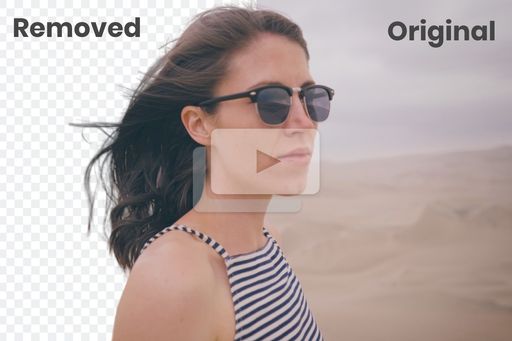
Unscreen's address now leads to Canva's Video Background Remover, a feature of Canva Pro. You upload a clip, pick the Background Remover from the Tools menu, and the background is removed in one click without a green screen.
The tool uses machine-learning to detect the main subject and builds a mask that is carried across every frame, leaving the background transparent. You can then layer a new scene behind the subject, either a video template, one of your own uploaded images, or a stock image from Canva's media library.
Because it lives in Canva's editor, you can continue working on the clip there: add subtitles, filters or speed changes, generate music, auto-edit with Magic Design for Video, and resize for different platforms with Magic Resize. Finished videos download as MP4 files.
What it does
- One-click background removal
- Removes the video background automatically from the Tools menu or toolbar, with no manual masking.
- No green screen needed
- AI detects the subject, so footage shot in any location can be isolated.
- Background replacement
- Place the subject over a template, an uploaded image or a stock image from the media library.
- Built-in video editor
- Add subtitles, filters and speed adjustments in the same project.
- AI music and auto-edit
- Generate custom music and use Magic Design for Video to auto-edit clips.
- Magic Resize for platforms
- Adapt the finished video to the format of different platforms (Pro).
- MP4 export
- Download the finished design as a high-quality MP4 file.
Good for
- Isolating a presenter in a tutorial video and placing them over a branded scene
- Showcasing a product in a promo clip with a clean background
- Replacing a cluttered backdrop without re-shooting
- Creating social videos with a subject over a template
- Avoiding manual masking or chroma keying in editing
Pricing
Paid
Video Background Remover is part of Canva Pro; plan prices not shown
Prices change. Check unscreen.com before you buy.
Unscreen FAQ
How do I remove a video background?
Upload your video, choose Background Remover under Tools (or BG Remover on the toolbar), and the background is removed in one click.
Do I need a green screen?
No. The AI detects and masks the subject automatically, so a green screen is not required.
Can I put a new background behind my subject?
Yes. Add a video template, upload your own image, or choose a stock image from Canva's media library, then adjust layers with Position.
Is the video background remover free?
The page presents it as a Canva Pro feature. Specific pricing was not available.
What format does the video export in?
You can download the finished video as a high-quality MP4 file.
What are the best alternatives to Unscreen?
The closest alternatives to Unscreen are Cutout Pro, PrimCut, HitPaw Watermark Remover, FlexClip and Runway.
Where this comes from
- Description: written from the project's website.