
Wisecut
AI editor that turns long videos into captioned, scheduled clips for creators
- Pricing
- Freemium
- Platforms
- Web, iOS, Android
- Listing updated
- 1 day ago
Similar tools


About Wisecut
Wisecut is a freemium AI tool for video editing. It is available on Web, iOS, Android and API.
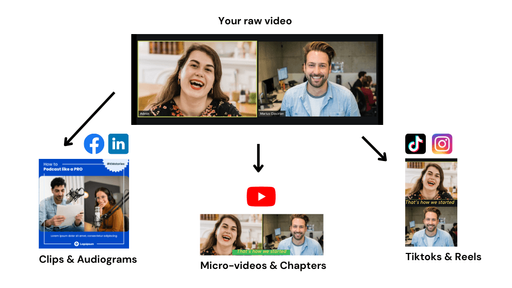
The Wisecut site says you can paste a video link or upload a file, and the AI picks out the strongest moments and prepares them as short clips to review. Edits can be requested through its assistant, Wish, or made directly in the transcript, where silences and repeated takes can be removed and each segment adjusted.
Beyond editing, the product covers finishing and distribution: captions, reframing to vertical, square or horizontal, noise and audio cleanup, thumbnails, and scheduling to connected social channels from a calendar. Autopilot, available on paid plans, is described as processing new videos from a connected channel automatically according to rules set through Wish.
The pricing page lists a free tier with limited editor minutes at 480p and no Autopilot or Social Hub, and paid Starter+ and Professional+ plans that use a shared monthly credit balance. It suits creators, marketing teams and agencies who regularly turn interviews, testimonials, podcasts or streams into short social posts.
What it does
- Highlight detection
- Finds the strongest moments in a long recording and turns each into a short clip.
- Transcript-based editing
- Lets you cut silences, false starts and repeated takes by editing the transcript text.
- Automatic captions
- Generates captions for clips, aimed at viewers watching without sound.
- Aspect ratio reframing
- Reformats a video to vertical, square or horizontal in one step.
- Audio cleanup
- Reduces background noise and lowers music automatically when someone is speaking.
- Social scheduling
- Publishes and schedules clips to connected networks from a calendar view.
- Autopilot processing
- On paid plans, processes new videos from a connected channel according to set rules.
Good for
- Turning hour-long interviews or podcasts into social media clips
- Cutting pauses and captioning testimonial or marketing videos
- Repurposing livestream recordings into posts after the broadcast ends
- Keeping several social channels supplied with regular short videos
- Producing thumbnails and hook titles for uploaded clips
Pricing
Freemium
Free plan with 30 min/month at 480p; paid Starter+ and Professional+ plans with monthly credits.
Prices change. Check wisecut.video before you buy.
Wisecut FAQ
Is there a free plan?
Yes. The pricing page lists a free plan with 30 minutes of editing per month at 480p, with no Autopilot, Social Hub or MCP access.
What does the paid plan cost?
The content provided does not state a monthly price in USD, so no starting price is listed here. Pricing shows Starter+ and Professional+ plans billed monthly with shared credits.
Does it support MCP?
The pricing page lists MCP as included on the Starter+ and Professional+ plans, not on the free plan.
Is Wisecut free?
Wisecut has a free plan, with paid plans for more usage or features.
What are the best alternatives to Wisecut?
The closest alternatives to Wisecut are Vidyo.ai, Captions, Descript, Vizard and Podcastle.
Where this comes from
- Description: written from the project's website.