Kapwing
Online video editor with AI tools for marketers, educators and creators
- Pricing
- Freemium
- Platforms
- Web, API
- Listing updated
- 2 days ago
Similar tools
About Kapwing
Kapwing is a freemium AI tool for video editing. It is available on Web and API.
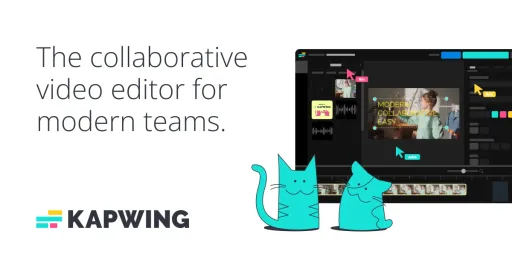
Kapwing is a browser-based video editor that adds generative AI on top of a conventional timeline. The README-free site describes a flow where you type a prompt and get back a multi-layer project with timing, sound and subtitles, which you can then refine by hand with a drag-and-drop timeline.
The editor covers trimming, combining clips, adding overlays and collaborating with teammates in a shared workspace. The company also points to voiceover, music, characters and a customizable script as part of its prompt-to-video feature, and its pricing page lists auto-subtitling, dubbing and text-to-speech limits by plan.
Kapwing is aimed at marketing teams producing campaign assets, internal communications staff publishing localized updates, creators working on YouTube-style content, and educators making classroom video. Its site also offers an MCP endpoint so AI agents can run Kapwing from a chatbot.
What it does
- Prompt-to-video generation
- Creates a draft video project with layers, timing, sound and subtitles from a text prompt.
- Drag-and-drop timeline editor
- Trim, combine and layer clips and overlays on a browser-based timeline.
- Auto-subtitling
- Generates subtitles automatically, with minute allowances that vary by plan.
- Dubbing and voice cloning
- Localizes video audio, with custom voice clones and lip sync listed on higher tiers.
- Collaborative workspace
- Shared workspace where team members can review and comment on projects.
- MCP server access
- Connects Kapwing to AI agents and chatbots through the Model Context Protocol.
Good for
- Producing campaign videos quickly while keeping brand assets consistent
- Localizing internal video updates for teams across several offices
- Turning rough ideas into polished short videos with templates
- Adding subtitles and voiceover to classroom or training video
- Letting an AI agent create or edit video through an MCP connection
Pricing
Freemium
Free plan with watermark and limits; paid plans with higher limits; custom enterprise tier
Prices change. Check kapwing.com before you buy.
Kapwing FAQ
Is there a free plan?
Yes. The pricing page lists a plan with unlimited watermarked exports, 720p quality, exports up to 4 minutes and 5 GB of cloud storage.
What does the paid plan add?
The listed upgrade adds no Kapwing watermark, 4K export, projects up to 2 hours, a Brand Kit, a shared workspace and 200 GB of storage.
Does Kapwing offer enterprise options?
The top tier lists custom billing, a dedicated account manager, SAML single sign-on, custom cloud storage and priority support.
Is Kapwing free?
Kapwing has a free plan, with paid plans for more usage or features.
What are the best alternatives to Kapwing?
The closest alternatives to Kapwing are Captions, Steve AI, Pictory, Wavel.ai and Subtitle Generator.
Where this comes from
- Description: written from the project's website.