iphone-cli (iph)
CLI and MCP server that lets AI agents read and operate apps on a real iPhone
iphone-cli (iph) is an open-source MCP server for developer tools. It runs locally on your machine and is started by your AI client.
- Pricing
- Open source
- Platforms
- macOS, Windows, CLI
- Runs
- Locally
- Version
- 0.1.9
- Listing updated
Similar MCP servers

Install
Run in a terminal
claude mcp add iphone-cli -- npx -y iphone-cliAdd to claude_desktop_config.json
{
  "mcpServers": {
    "iphone-cli": {
      "command": "npx",
      "args": [
        "-y",
        "iphone-cli"
      ]
    }
  }
}Add to ~/.cursor/mcp.json
{
  "mcpServers": {
    "iphone-cli": {
      "command": "npx",
      "args": [
        "-y",
        "iphone-cli"
      ]
    }
  }
}Add to .vscode/mcp.json
{
  "servers": {
    "iphone-cli": {
      "type": "stdio",
      "command": "npx",
      "args": [
        "-y",
        "iphone-cli"
      ]
    }
  }
}
Add to ~/.codeium/windsurf/mcp_config.json
{
  "mcpServers": {
    "iphone-cli": {
      "command": "npx",
      "args": [
        "-y",
        "iphone-cli"
      ]
    }
  }
}
Add to your client's MCP settings (most use this shape)
{
  "mcpServers": {
    "iphone-cli": {
      "command": "npx",
      "args": [
        "-y",
        "iphone-cli"
      ]
    }
  }
}
Using several servers? Build one config file with the MCP config generator.
About iphone-cli (iph)
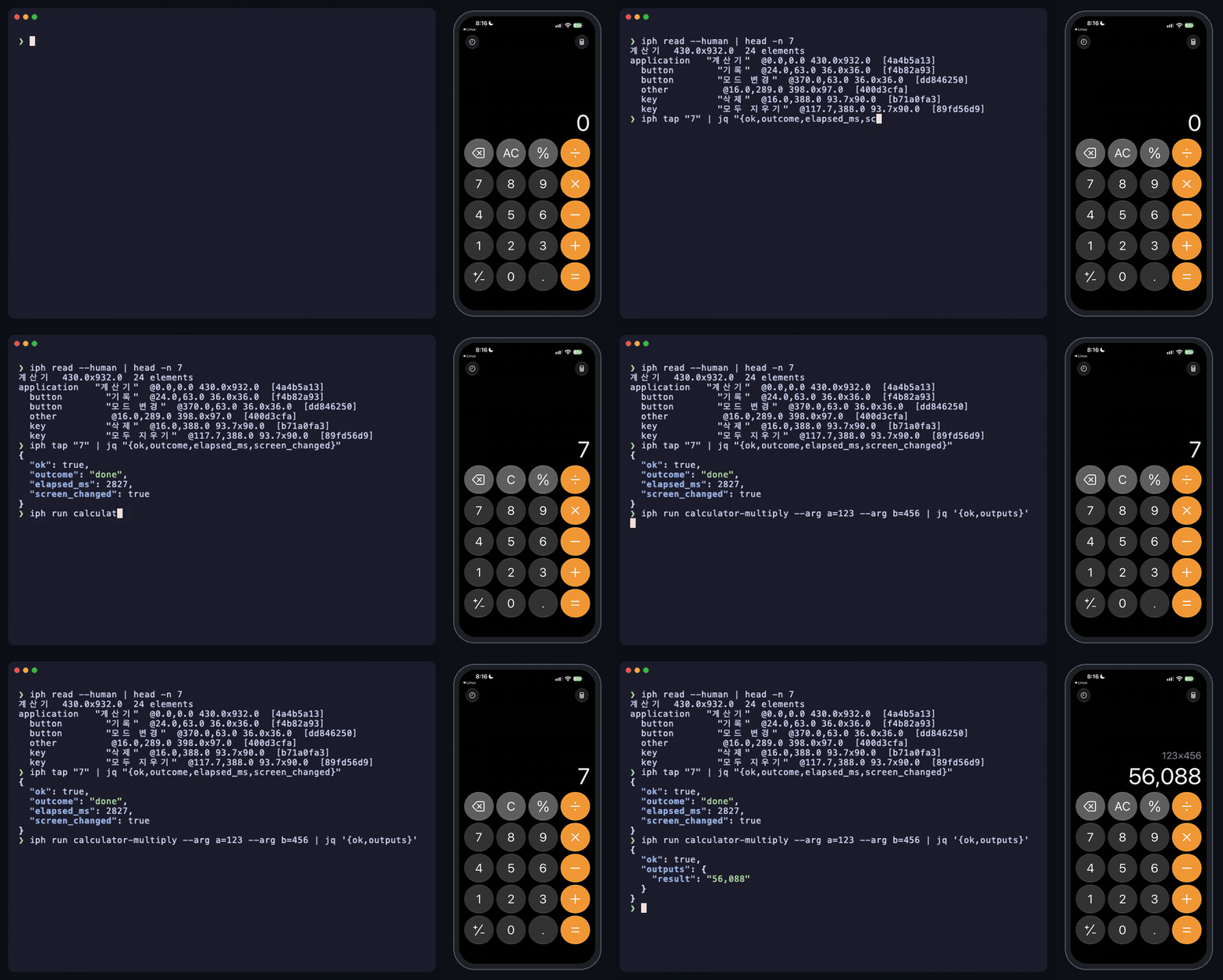
The README says iph reads the iPhone's accessibility tree over USB or Wi-Fi and drives any app on it, so an agent can see labelled buttons, fields and rows instead of working from screenshots. It runs as a single native binary on macOS and Windows, with no Xcode, WebDriverAgent or app installed on the phone.
Commands return compact JSON with an explicit outcome (done, not_sent or unknown), so an agent or script can tell whether input may have reached the phone before it retries. A built-in QuickJS engine lets a multi-step flow run in one call, and a resident daemon keeps the connection warm between requests.
It is aimed at developers and testers who want Claude Code or Codex to operate a real iOS 27+ device. The project states it was verified on one iPhone 15 Pro Max running iOS 27.0.1, and that iOS 26 and earlier, simulators and Android are out of scope.
Tools this server provides (20)
Taken from the project documentation; the running server may differ.
- iph_connect
- Connect to a paired phone.
- iph_read
- Read elements on screen.
- iph_find
- Find elements matching a selector.
- iph_tap
- Tap an element or point.
- iph_swipe
- Swipe the screen.
- iph_pinch
- Pinch or spread two fingers.
- iph_scroll
- Scroll one step or until an element shows.
- iph_type
- Paste text into the focused field.
- iph_key
- Send a keyboard key.
- iph_button
- Press a hardware button.
- iph_launch
- Launch an app.
- iph_apps
- List installed apps.
- iph_screenshot
- Capture a PNG screenshot.
- iph_batch
- Run a sequence of steps.
- iph_script
- Run a JavaScript script.
- iph_run
- Run a saved script.
- iph_scripts
- List saved scripts.
- iph_doctor
- Check setup and connection.
- iph_dnd
- Control Do Not Disturb.
- iph_syslog
- Capture the phone's log.
What it does
- Accessibility tree reading
- Returns on-screen elements with role, label, value and frame as structured JSON.
- Outcome-based results
- Each action reports done, not_sent or unknown so retries can be judged safely.
- Embedded JavaScript scripting
- Runs loops, conditions and list scrolling inside one call via a sandboxed QuickJS engine.
- MCP server and CLI
- Exposes about 20 tools over stdio for Claude Code and Codex, plus a shell interface.
- No Xcode or WebDriverAgent
- Connects to Apple's developer services directly, with nothing installed on the phone.
- Do Not Disturb control
- Turns Do Not Disturb on or restores the earlier Focus to reduce banners blocking taps.
Good for
- Letting an AI coding agent test an iOS app's UI on a real device
- Scripting repeated navigation steps in Settings or other stock apps
- Reading values such as the iOS version or list contents from the phone
- Checking what an app logs after each tap using the syslog capture
- Driving a real iPhone from a Windows machine without a Mac
Pricing
Open source
MIT licensed; free to install from GitHub, crates.io or the install script.
Prices change. Check hyunseob.github.io before you buy.
iphone-cli (iph) FAQ
How can Claude Code or Codex control a real iPhone without Xcode or WebDriverAgent?
The README says you install iph, connect an iOS 27+ iPhone over USB, run iph setup, and register the built-in MCP server with claude mcp add iph -- iph mcp or the Codex equivalent.
Does iphone-cli work on Windows?
Yes. The README lists a single native binary for macOS and Windows 10/11 x64, and says Apple's device service must be installed on Windows first.
Which iOS versions are supported?
The project targets iOS 27 or later. The README says iOS 26 and earlier were not tried and are expected not to work for touch and text input.
How does iphone-cli (iph) avoid duplicate taps?
Results separate sent from verified and report an outcome of unknown when input may have landed. Scripts stop at an unknown outcome so the caller can read the screen before acting again.
Is iphone-cli (iph) free?
Yes. iphone-cli (iph) is open source, so you can use and self-host it for free.
How do I add iphone-cli (iph) to Claude Code?
Run this command in your terminal: claude mcp add iphone-cli -- npx -y iphone-cli
What are the best alternatives to iphone-cli (iph)?
The closest alternatives to iphone-cli (iph) are iPhone Use, iPhone MCP, thumbs, Mobster and Zeptap.
Where this comes from
- Description: written from the project's README, the project's website and its MCP Registry entry.
- Install steps: from the official MCP Registry entry.