
LightPDF
Cloud-based AI PDF editor and converter for reading, editing, signing and OCR
LightPDF is a freemium AI tool for productivity. It is available on Web, iOS, Android, macOS and Windows.
- Pricing
- Freemium
- Platforms
- Web, iOS, Android
- Listing updated
Similar tools



About LightPDF
LightPDF is a browser-based workspace for working with PDFs, with AI features layered over conventional tasks such as converting, annotating, signing and merging documents. The site lists a free tier alongside monthly, yearly and lifetime paid plans, and says the same account can be used on Windows, Mac, iOS, Android and the web.
Beyond core editing, the product bundles several AI utilities that draw on a shared credit allowance: a document chat agent with citations, a PDF generator, a presentation builder, mind-map and summary generation, and translation for full documents and scanned pages. Data extraction from invoices, receipts and bank statements is also offered, along with watermark and sticker removal for images and PDFs.
The pricing page indicates that AI credits reset monthly on subscription plans, while the lifetime plan includes a one-time pool of credits. Per-feature credit costs are listed in the comparison table, so heavy users of translation or image processing will want to check those figures before subscribing. Teams and enterprises can request custom plans.
What it does
- Cloud PDF editing
- Edit, annotate, sign, merge and organise PDFs through a browser interface with no local install required.
- AI document chat
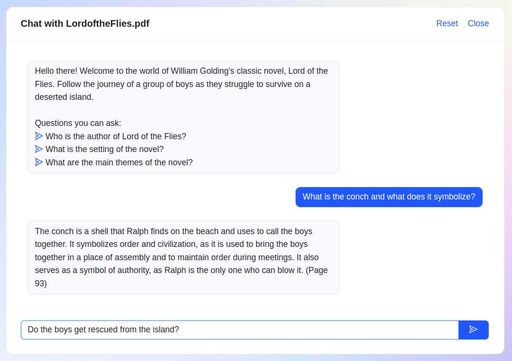
- Ask questions about a document and receive answers with traced citations, subject to a daily or credit-based limit.
- Document translation
- Translate full PDFs and scanned pages into more than 20 languages while keeping the original layout.
- Structured data extraction
- Pull fields from invoices, receipts, bank statements and purchase orders into spreadsheet-ready output.
- Watermark and sticker removal
- Detect and remove watermarks from PDFs and images, with manual and automatic modes.
- Cross-platform sync
- Use one account across Windows, Mac, iOS, Android and the web, with Premium features tied to one device at a time.
Good for
- Converting and editing scanned contracts or forms that need OCR
- Summarising long reports and generating mind maps from them
- Translating multi-page documents while preserving their layout
- Extracting invoice or bank statement data into Excel
- Removing watermarks or handwriting from scanned documents
Pricing
Freemium, from $5.99 a month
Free plan; Monthly $5.99/mo, Yearly $15.99/yr, Lifetime $39.99 one-time
Prices change. Check lightpdf.com before you buy.
LightPDF FAQ
Is there a free plan?
Yes. The free plan is listed at $0 with limited access to selected features, and the yearly plan includes a 3-day free trial.
How do AI credits work?
Monthly and yearly plans receive 1,000 credits per month that expire at the end of each month. The lifetime plan includes 40,000 credits that remain valid until used.
How many devices can I use with one Premium account?
One Premium account works on Windows, Mac, Android, iOS and the web, but Premium features can only be used on one device at a time.
Do you offer team plans?
Yes. Custom plans for teams and enterprises include centralised billing, user management and volume discounts, quoted by the sales team.
What are the best alternatives to LightPDF?
The closest alternatives to LightPDF are ChatPDF, Parseur, ChatDOC, Speechify and ScannerGo.
Where this comes from
- Description: written from the project's website.