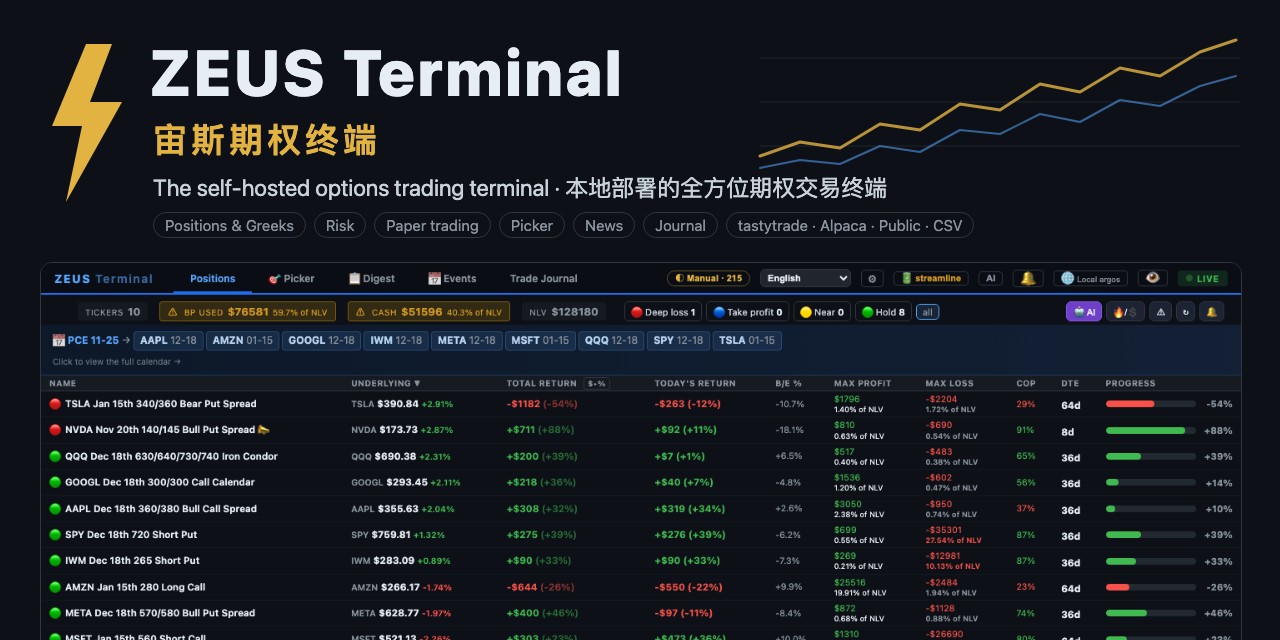
ZEUS Terminal
Self-hosted options terminal: positions, Greeks, risk, paper trading and a trade journal
- Pricing
- Free
- Platforms
- macOS, Linux, Windows
- Runs
- Remotely
- Version
- 0.7.1
- Listing updated
- 3 days ago
About ZEUS Terminal
ZEUS Terminal is a free MCP server for developer tools. It runs as a hosted remote server, so there is nothing to install locally.
ZEUS reads your broker and never places an order. It marks every leg to market, groups legs into strategies such as verticals, iron condors and calendars, and shows P/L, breakeven distance, max profit and loss, chance of profit and days to expiry. A risk view adds stress tests, an expiration ladder and Monte Carlo odds for the whole book.
Other pages cover exit alerts and a four-gate pre-trade checkup, paper trading on the live chain, a chart-wall stock picker with a TA screener, a news desk merging four wires with English and Chinese headlines, earnings and SEC filings, and a journal that computes win rate and profit factor from fills. Data comes from tastytrade, Alpaca, Public or a CSV; without a broker, delayed free quotes are used.
The MCP server, run locally over HTTP on port 8765, lets agents read positions, run the checkup and price spreads. Licensed PolyForm Noncommercial; install with pipx or Docker.
Install
Run in a terminal
claude mcp add zeus-options-terminal -- uvx zeus-options-terminalAdd to claude_desktop_config.json
{
  "mcpServers": {
    "zeus-options-terminal": {
      "command": "uvx",
      "args": [
        "zeus-options-terminal"
      ]
    }
  }
}Add to ~/.cursor/mcp.json
{
  "mcpServers": {
    "zeus-options-terminal": {
      "command": "uvx",
      "args": [
        "zeus-options-terminal"
      ]
    }
  }
}Add to .vscode/mcp.json
{
  "servers": {
    "zeus-options-terminal": {
      "type": "stdio",
      "command": "uvx",
      "args": [
        "zeus-options-terminal"
      ]
    }
  }
}
Add to ~/.codeium/windsurf/mcp_config.json
{
  "mcpServers": {
    "zeus-options-terminal": {
      "command": "uvx",
      "args": [
        "zeus-options-terminal"
      ]
    }
  }
}
Add to your client's MCP settings (most use this shape)
{
  "mcpServers": {
    "zeus-options-terminal": {
      "command": "uvx",
      "args": [
        "zeus-options-terminal"
      ]
    }
  }
}
What it does
- Positions and Greeks
- Strategies marked to market with P/L and probability of profit.
- Risk view
- Stress tests, expiration ladder and Monte Carlo odds.
- Paper trading
- Build strategies on the live option chain.
- Trade journal
- Win rate, profit factor and what-if analysis from fills.
- Broker choice
- tastytrade, Alpaca, Public or a CSV; read-only.
Good for
- Review portfolio Greeks and risk in one place
- Practise a spread in paper trading
- Let an agent price a spread
- Keep a journal of closed trades
Pricing
Free
Free for personal noncommercial use
Prices change. Check jackson-cmd.github.io before you buy.
ZEUS Terminal FAQ
Can it place trades?
No, the site says it only reads from your broker.
Is it free?
Free for personal, noncommercial use under the PolyForm Noncommercial licence.
Where does it run?
On your own computer, with Python 3.10+ or Docker.
Do I need a broker?
No; a CSV or the free data mode works.
Is ZEUS Terminal free?
Yes. ZEUS Terminal is free to use.
How do I add ZEUS Terminal to Claude Code?
Run this command in your terminal: claude mcp add zeus-options-terminal -- uvx zeus-options-terminal
What are the best alternatives to ZEUS Terminal?
The closest alternatives to ZEUS Terminal are REA, Codebase Memory, GitHub, Serena MCP: the IDE for your agent and XERJ.
Alternatives to ZEUS Terminal

REA
MCP serverCLI and MCP server that lets coding agents reverse engineer apps and binaries
Runs locally- Open source
- 464K GitHub stars
- Developer tools

Codebase Memory
MCP serverLocal MCP server that builds a code knowledge graph for AI coding agents
Runs locally- Open source
- 48.7K GitHub stars
- Knowledge and memory

GitHub
MCP serverOfficial MCP server connecting AI assistants to GitHub repos, issues and workflows
Not checked yet- Remote
- Open source
- 34.5K GitHub stars
- Developer tools

Serena MCP: the IDE for your agent
MCP serverMCP toolkit giving coding agents symbol-level code retrieval and editing
Runs locally- Open source
- 31.5K GitHub stars
- Developer tools

XERJ
MCP serverLocal search engine for AI agents with cited answers over your code and docs
Runs locally- Open source
- 19.2K GitHub stars
- Knowledge and memory

Agent-Native Analytics
MCP serverOpen-source analytics app where an AI agent builds charts and dashboards from your data
- Remote
- Open source
- 7.7K GitHub stars
- Analytics and data