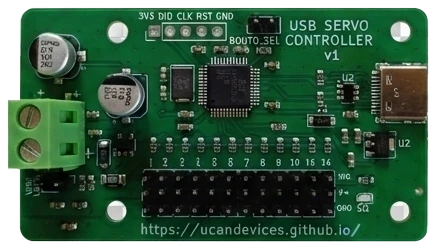
USB Servo Controller
Let an AI agent move hobby servos on an open-hardware USB-C controller
- Pricing
- Open source
- Platforms
- CLI, Windows, Linux
- Runs
- Locally
- Version
- 0.4.1
- Listing updated
- 2 days ago
About USB Servo Controller
USB Servo Controller is an open-source MCP server for developer tools. It runs locally on your machine and is started by your AI client.
The controller behind this server is a 66 x 38 mm board with 12 servo outputs, a USB-C virtual COM port and a separate servo supply of about 5 A. It speaks the Pololu Maestro serial protocols, so existing Maestro libraries work, and it watches rail current and voltage with overcurrent and undervoltage cut-off.
The MCP server sits on top of that. An agent can move channels, run saved poses and sequences, and read rail current and voltage, within guardrails: per-channel travel limits, ramped moves and an overcurrent stop. A --mock option lets you try it with no hardware, and it can read the limits and poses saved by the desktop GUI. Only one program can hold the serial port, so close the GUI first.
The README says the first board was verified on hardware, but channels 1 to 11 had not yet been driven with a real servo at that point. Hardware and firmware are open source; the board is sold on Tindie for $18.
Install
Run in a terminal
claude mcp add usb-servo-controller -- uvx ucan-servo-mcpAdd to claude_desktop_config.json
{
  "mcpServers": {
    "usb-servo-controller": {
      "command": "uvx",
      "args": [
        "ucan-servo-mcp"
      ]
    }
  }
}Add to ~/.cursor/mcp.json
{
  "mcpServers": {
    "usb-servo-controller": {
      "command": "uvx",
      "args": [
        "ucan-servo-mcp"
      ]
    }
  }
}Add to .vscode/mcp.json
{
  "servers": {
    "usb-servo-controller": {
      "type": "stdio",
      "command": "uvx",
      "args": [
        "ucan-servo-mcp"
      ]
    }
  }
}
Add to ~/.codeium/windsurf/mcp_config.json
{
  "mcpServers": {
    "usb-servo-controller": {
      "command": "uvx",
      "args": [
        "ucan-servo-mcp"
      ]
    }
  }
}
Add to your client's MCP settings (most use this shape)
{
  "mcpServers": {
    "usb-servo-controller": {
      "command": "uvx",
      "args": [
        "ucan-servo-mcp"
      ]
    }
  }
}
What it does
- Servo moves
- Move any of 12 channels with ramped motion.
- Poses and sequences
- Run saved poses and timed sequences.
- Rail monitoring
- Read servo supply current and voltage.
- Safety guardrails
- Per-channel limits and an overcurrent stop.
- Mock mode
- Try the server without a board.
- Maestro compatible
- Works with Pololu Maestro serial protocols.
Good for
- Let an assistant pose a small robot arm
- Test servo limits safely before wiring a project
- Check servo rail current during a sequence
- Prototype agent-driven hardware without hardware
Pricing
Open source
Open hardware and firmware; board $18 on Tindie
Prices change. Check ucandevices.github.io before you buy.
USB Servo Controller FAQ
How do I run it?
Use `uvx ucan-servo-mcp`, or run tools/servo_mcp.py from the repository.
Can I try it without the board?
Yes, with the --mock argument.
How much is the board?
The README lists $18 on Tindie.
Why does it say the port is busy?
Only one program can hold the serial port, so close the GUI first.
Is USB Servo Controller free?
Yes. USB Servo Controller is open source, so you can use and self-host it for free.
How do I add USB Servo Controller to Claude Code?
Run this command in your terminal: claude mcp add usb-servo-controller -- uvx ucan-servo-mcp
What are the best alternatives to USB Servo Controller?
The closest alternatives to USB Servo Controller are REA, Codebase Memory, GitHub, Serena MCP: the IDE for your agent and XERJ.
Alternatives to USB Servo Controller

REA
MCP serverCLI and MCP server that lets coding agents reverse engineer apps and binaries
Runs locally- Open source
- 464K GitHub stars
- Developer tools

Codebase Memory
MCP serverLocal MCP server that builds a code knowledge graph for AI coding agents
Runs locally- Open source
- 48.7K GitHub stars
- Knowledge and memory

GitHub
MCP serverOfficial MCP server connecting AI assistants to GitHub repos, issues and workflows
Not checked yet- Remote
- Open source
- 34.5K GitHub stars
- Developer tools

Serena MCP: the IDE for your agent
MCP serverMCP toolkit giving coding agents symbol-level code retrieval and editing
Runs locally- Open source
- 31.5K GitHub stars
- Developer tools

XERJ
MCP serverLocal search engine for AI agents with cited answers over your code and docs
Runs locally- Open source
- 19.2K GitHub stars
- Knowledge and memory

Ouroboros
MCP serverSpec-first layer that pins requirements and verifies results of AI coding agent work
Runs locally- Open source
- 6.4K GitHub stars
- Developer tools