USB LIN Converter
Sniff and decode a car's LIN bus from an AI agent via a USB LIN dongle
- Pricing
- Open source
- Platforms
- CLI, Linux, macOS
- Runs
- Locally
- Version
- 0.1.2
- Listing updated
- 3 days ago
About USB LIN Converter
USB LIN Converter is an open-source MCP server for developer tools. It runs locally on your machine and is started by your AI client.
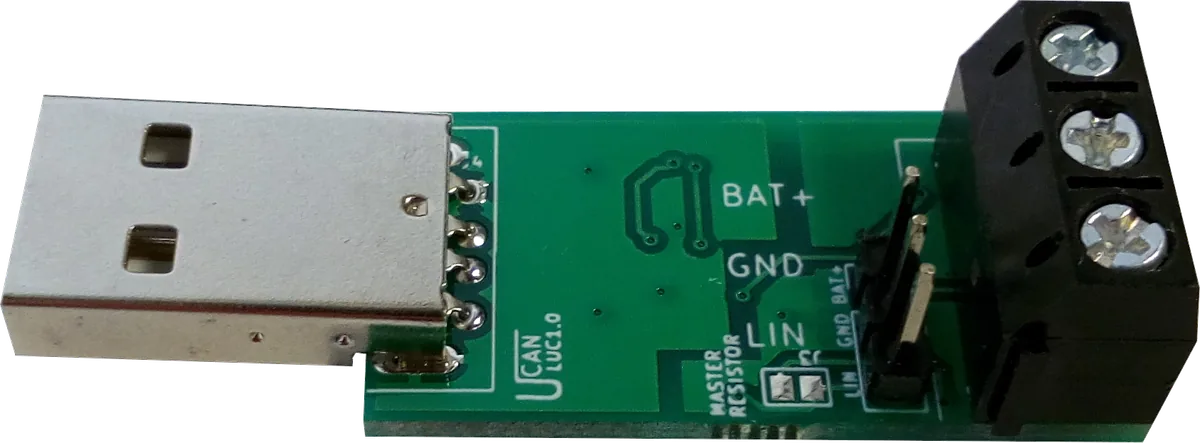
The server ships with the open-source uLC dongle, a 31 x 18 mm STM32-based board that appears on the PC as a virtual COM port and speaks an SLCAN-style ASCII protocol. The registry entry describes the agent side as capturing traffic, spotting changing bits, detecting bus speed and decoding LDF files.
The README says it can capture traffic with per-ID periods and changing bits, log every data change while you press a button, find the bus speed and checksum type automatically, and decode or encode signals from an LDF file. It is read-only by default; sending frames or acting as LIN master or slave requires the --allow-transmit flag.
It runs locally over stdio from PyPI (uvx ucan-lin-mcp), and a --mock mode lets you try it without hardware. Real use needs the dongle plus an external 4.5 to 28 V supply for the LIN side.
Install
Run in a terminal
claude mcp add lin-usb-converter -- uvx ucan-lin-mcpAdd to claude_desktop_config.json
{
  "mcpServers": {
    "lin-usb-converter": {
      "command": "uvx",
      "args": [
        "ucan-lin-mcp"
      ]
    }
  }
}Add to ~/.cursor/mcp.json
{
  "mcpServers": {
    "lin-usb-converter": {
      "command": "uvx",
      "args": [
        "ucan-lin-mcp"
      ]
    }
  }
}Add to .vscode/mcp.json
{
  "servers": {
    "lin-usb-converter": {
      "type": "stdio",
      "command": "uvx",
      "args": [
        "ucan-lin-mcp"
      ]
    }
  }
}
Add to ~/.codeium/windsurf/mcp_config.json
{
  "mcpServers": {
    "lin-usb-converter": {
      "command": "uvx",
      "args": [
        "ucan-lin-mcp"
      ]
    }
  }
}
Add to your client's MCP settings (most use this shape)
{
  "mcpServers": {
    "lin-usb-converter": {
      "command": "uvx",
      "args": [
        "ucan-lin-mcp"
      ]
    }
  }
}
What it does
- Bus capture
- Records LIN traffic with per-ID periods and which bits change.
- Change logging
- Logs every data change while you operate a control such as a button.
- Auto-detect speed
- Finds the bus baud rate and checksum type automatically.
- LDF decoding
- Decodes and encodes signals using an LDF description file.
- Read-only default
- Transmitting or acting as master/slave needs --allow-transmit.
- Mock mode
- Run with --mock to try the server without the dongle.
Good for
- Reverse-engineer which LIN frame a car switch uses
- Find the baud rate of an unknown LIN network
- Decode captured frames into named signals with an LDF
- Monitor a LIN bus while developing a slave device
Pricing
Open source
Open-source software; the dongle is sold for about $27
Prices change. Check ucandevices.github.io before you buy.
USB LIN Converter FAQ
Can the server send frames onto the bus?
Only if started with --allow-transmit; it is read-only by default.
Do I need hardware?
Yes for a real bus: the USB LIN Converter dongle. A --mock flag runs it without one.
How do I install it?
Run `uvx ucan-lin-mcp` from PyPI (Python 3.10 or newer).
Does the dongle need drivers?
No driver is needed on Windows 10/11, Linux or macOS; it uses the built-in USB CDC driver.
Is USB LIN Converter free?
Yes. USB LIN Converter is open source, so you can use and self-host it for free.
How do I add USB LIN Converter to Claude Code?
Run this command in your terminal: claude mcp add lin-usb-converter -- uvx ucan-lin-mcp
What are the best alternatives to USB LIN Converter?
The closest alternatives to USB LIN Converter are REA, Codebase Memory, GitHub, Serena MCP: the IDE for your agent and XERJ.
Alternatives to USB LIN Converter

REA
MCP serverCLI and MCP server that lets coding agents reverse engineer apps and binaries
Runs locally- Open source
- 464K GitHub stars
- Developer tools

Codebase Memory
MCP serverLocal MCP server that builds a code knowledge graph for AI coding agents
Runs locally- Open source
- 48.7K GitHub stars
- Knowledge and memory

GitHub
MCP serverOfficial MCP server connecting AI assistants to GitHub repos, issues and workflows
Not checked yet- Remote
- Open source
- 34.5K GitHub stars
- Developer tools

Serena MCP: the IDE for your agent
MCP serverMCP toolkit giving coding agents symbol-level code retrieval and editing
Runs locally- Open source
- 31.5K GitHub stars
- Developer tools

XERJ
MCP serverLocal search engine for AI agents with cited answers over your code and docs
Runs locally- Open source
- 19.2K GitHub stars
- Knowledge and memory

Ouroboros
MCP serverSpec-first layer that pins requirements and verifies results of AI coding agent work
Runs locally- Open source
- 6.4K GitHub stars
- Developer tools