Understand This Video For Me AI Plugin
Local MCP plugin that gives your AI video key frames and a timestamped transcript
- Pricing
- Paid
- Platforms
- macOS, Windows
- Runs
- Locally
- Version
- 1.0.3
- Listing updated
- 3 days ago
About Understand This Video For Me AI Plugin
Understand This Video For Me AI Plugin is a paid MCP server for design and media. It runs locally on your machine and is started by your AI client.
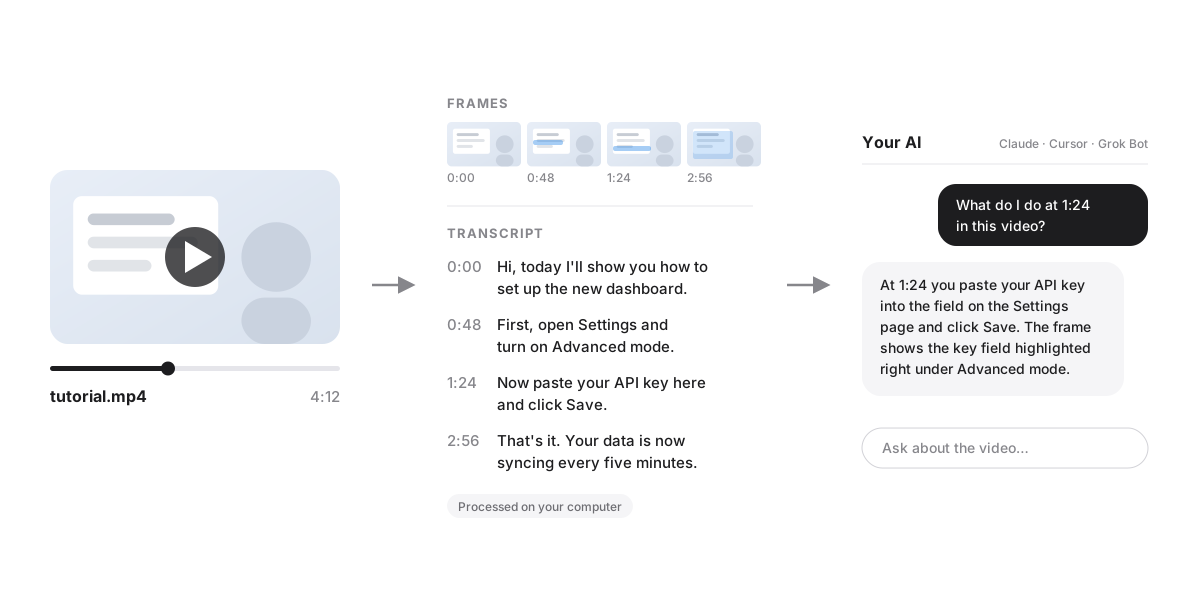
Chat assistants usually see only a handful of screenshots from a video and hear nothing. This plugin runs on your own machine instead: ffmpeg extracts key frames and faster-whisper transcribes the audio word by word with timestamps. The result, frames plus transcript, is handed to the AI client so it can answer questions with a timestamp attached. The registry entry also mentions a contact sheet.
The vendor says nothing is uploaded and that only the license key and an instance ID are sent to Freemius for license checks. Setup uses an installer script for Mac or Windows that asks for your license key and configures Claude Desktop and Cursor. Claude Code, Grok Bot, Windsurf, VS Code, LM Studio and Cline are covered by short guide steps. A browser version for ChatGPT, Claude and Grok on the web is listed as coming soon.
It is sold as a $49 one-time lifetime license with no subscription. Refunds apply only if it will not install or run, requested within 7 days. The site pitches it to creators, marketers, developers and heavy AI users.
Install
Run in a terminal
claude mcp add understand-this-video -- npx -y https://github.com/africaappstudio-max/understand-this-video-mcp/releases/download/v1.0.3/understand-this-video.mcpbAdd to claude_desktop_config.json
{
  "mcpServers": {
    "understand-this-video": {
      "command": "npx",
      "args": [
        "-y",
        "https://github.com/africaappstudio-max/understand-this-video-mcp/releases/download/v1.0.3/understand-this-video.mcpb"
      ]
    }
  }
}Add to ~/.cursor/mcp.json
{
  "mcpServers": {
    "understand-this-video": {
      "command": "npx",
      "args": [
        "-y",
        "https://github.com/africaappstudio-max/understand-this-video-mcp/releases/download/v1.0.3/understand-this-video.mcpb"
      ]
    }
  }
}Add to .vscode/mcp.json
{
  "servers": {
    "understand-this-video": {
      "type": "stdio",
      "command": "npx",
      "args": [
        "-y",
        "https://github.com/africaappstudio-max/understand-this-video-mcp/releases/download/v1.0.3/understand-this-video.mcpb"
      ]
    }
  }
}
Add to ~/.codeium/windsurf/mcp_config.json
{
  "mcpServers": {
    "understand-this-video": {
      "command": "npx",
      "args": [
        "-y",
        "https://github.com/africaappstudio-max/understand-this-video-mcp/releases/download/v1.0.3/understand-this-video.mcpb"
      ]
    }
  }
}
Add to your client's MCP settings (most use this shape)
{
  "mcpServers": {
    "understand-this-video": {
      "command": "npx",
      "args": [
        "-y",
        "https://github.com/africaappstudio-max/understand-this-video-mcp/releases/download/v1.0.3/understand-this-video.mcpb"
      ]
    }
  }
}
What it does
- Local frame extraction
- ffmpeg pulls key frames from a video file on your computer.
- Timestamped transcripts
- faster-whisper transcribes every spoken word with timestamps.
- No video upload
- Processing happens locally, and the vendor says it never receives your videos.
- Installer scripts
- Mac and Windows scripts set up the plugin and configure Claude Desktop and Cursor.
- One-time license
- A single $49 payment buys a lifetime license, with no subscription.
Good for
- Summarise a webinar or tutorial recording
- Ask which moment in a screen recording shows a bug
- Break down competitor ads frame by frame
- Turn a video walkthrough into context for a coding assistant
- Get timestamped answers about a video's spoken content
Pricing
Paid
$49 one-time lifetime license
Prices change. Check understandvideo.shipmonthly.com before you buy.
Understand This Video For Me AI Plugin FAQ
Are my videos uploaded?
No. Frames and transcripts are created on your computer, and the vendor says it never receives your videos.
Is it a subscription?
No. It is a $49 one-time payment for a lifetime license.
Which apps does it work with?
Claude Desktop, Cursor and Grok Bot, plus MCP apps such as Windsurf, VS Code, Claude Code, LM Studio and Cline.
Can I get a refund?
Only if it will not install or run, you email within 7 days and it cannot be fixed within 48 hours.
Is Understand This Video For Me AI Plugin free?
No. Understand This Video For Me AI Plugin is a paid product.
How do I add Understand This Video For Me AI Plugin to Claude Code?
Run this command in your terminal: claude mcp add understand-this-video -- npx -y https://github.com/africaappstudio-max/understand-this-video-mcp/releases/download/v1.0.3/understand-this-video.mcpb
What are the best alternatives to Understand This Video For Me AI Plugin?
The closest alternatives to Understand This Video For Me AI Plugin are HyperFrames by HeyGen, ffmpeg-skill, AvatarSay — Fictional Character & Talking Video MCP, ChartAnt and VfxSmith.
Alternatives to Understand This Video For Me AI Plugin

HyperFrames by HeyGen
MCP serverHosted MCP connector for creating and rendering videos from HTML through AI chat
- Remote
- Freemium
- 85.3K GitHub stars
- Design and media

ffmpeg-skill
MCP serverLocal FFmpeg video and audio editing tools for coding agents over MCP
Runs locally- Open source
- 6.9K GitHub stars
- Design and media

Generate fictional character portraits and lip-synced talking videos from text over MCP
- 10 tools
- Remote
- Freemium
- Design and media

ChartAnt
MCP serverRemote MCP server returning charts, maps and dashboards as hosted PNG links
- 51 tools
- Remote
- Freemium
- Design and media

VfxSmith
MCP serverSearch, generate, refine and export pixel art game effects from Claude Code or Codex
Not checked yet- Remote
- Freemium
- Design and media

CalderFlow
MCP serverTurn notes or specs into editable flowcharts, timelines and funnels from an AI assistant
- 10 tools
- Remote
- Free
- Design and media