rednote-gate
Local MCP server for a throwaway RedNote account; every write waits for your Approve
- Pricing
- Open source
- Platforms
- CLI, macOS, Windows
- Runs
- Locally
- Version
- 1.1.1
- Listing updated
- 1 day ago
About rednote-gate
rednote-gate is an open-source MCP server for browser automation. It runs locally on your machine and is started by your AI client.
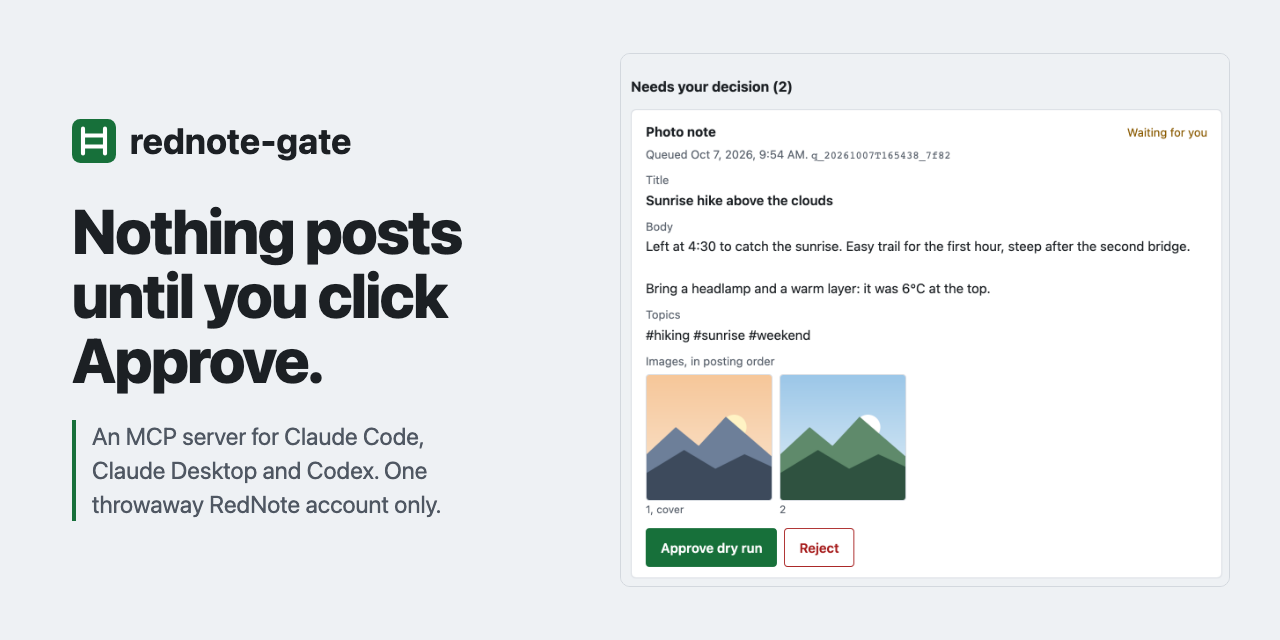
Claude Code, Claude Desktop or Codex can research, draft notes and replies, and queue them, but nothing is posted, commented or liked until the user clicks Approve on a local page on 127.0.0.1. After approval there is a 30-second cancel window, and a screenshot of what the browser did is shown afterwards. Because approval lives in code outside MCP, the model cannot approve its own writes.
There are 15 tools: 5 reads that run immediately (search, read a note, read comments, list own notes, make text-card images), 6 write tools that only queue photo notes, video notes, drafts, comments, replies and likes, and 4 local tools. Six prompts, such as post_photos and reply_to_comments, appear as slash commands in Claude Code. Defaults allow 5 writes and 10 likes a day and one comment every 10 minutes, tracked in an append-only ledger.
The project is explicit that it drives the RedNote website with a browser, which is against RedNote's terms, so the account can be banned and only a throwaway account should be used. It stops on a captcha or a too-frequent warning and never solves captchas or retries.
Install
Run in a terminal
claude mcp add rednote-gate -- npx -y rednote-gateAdd to claude_desktop_config.json
{
  "mcpServers": {
    "rednote-gate": {
      "command": "npx",
      "args": [
        "-y",
        "rednote-gate"
      ]
    }
  }
}Add to ~/.cursor/mcp.json
{
  "mcpServers": {
    "rednote-gate": {
      "command": "npx",
      "args": [
        "-y",
        "rednote-gate"
      ]
    }
  }
}Add to .vscode/mcp.json
{
  "servers": {
    "rednote-gate": {
      "type": "stdio",
      "command": "npx",
      "args": [
        "-y",
        "rednote-gate"
      ]
    }
  }
}
Add to ~/.codeium/windsurf/mcp_config.json
{
  "mcpServers": {
    "rednote-gate": {
      "command": "npx",
      "args": [
        "-y",
        "rednote-gate"
      ]
    }
  }
}
Add to your client's MCP settings (most use this shape)
{
  "mcpServers": {
    "rednote-gate": {
      "command": "npx",
      "args": [
        "-y",
        "rednote-gate"
      ]
    }
  }
}
What it does
- Approval in code
- Write tools only queue; a worker acts on items a human approved locally.
- Exact-content check
- Images are hashed when queued and verified before upload.
- Daily limits
- A ledger enforces caps that a restart does not reset.
- Stops on captcha
- A captcha or too-frequent warning halts everything until resumed.
- Screenshot of each attempt
- The approval page shows what the browser saw.
- Prompts
- Slash commands for posting photos, replying and research.
Good for
- Draft a photo note from images and a one-line brief
- Reply to comments with up to 3 drafted replies
- Research which notes work for a topic, read only
- Review the queue of pending items
Pricing
Open source
Open source, installed from npm
Prices change. Check yashshelar007.github.io before you buy.
rednote-gate FAQ
Can Claude post by itself?
No. Writes only queue until a human clicks Approve on the local approval page.
Is it safe for my main account?
No. The README says to use only a throwaway account because browser automation breaks RedNote's terms and may lead to a ban.
What does it need?
Node 20 or newer; npm install -g rednote-gate then rednote-gate setup installs Chromium and a QR login.
Does it solve captchas?
No. It stops and waits for you to resume.
Is rednote-gate free?
Yes. rednote-gate is open source, so you can use and self-host it for free.
How do I add rednote-gate to Claude Code?
Run this command in your terminal: claude mcp add rednote-gate -- npx -y rednote-gate
What are the best alternatives to rednote-gate?
The closest alternatives to rednote-gate are Browser Use, Scrapling MCP Server, Google Ads + Meta Ads + SEO/GEO MCP, Oya Browser and Mantis.
Alternatives to rednote-gate

Browser Use
MCP serverBrowser agents and cloud browsers for AI, with an MCP server for web tasks
- 7 tools
- Remote
- Freemium
- 121K GitHub stars
- Browser automation

Scrapling MCP Server
MCP serverMCP server for AI clients to scrape sites with HTTP and stealth browser sessions
Runs locally- 17 tools
- Open source
- 104K GitHub stars
- Web search and scraping

Google Ads + Meta Ads + SEO/GEO MCP
MCP serverHosted MCP connector for managing Google Ads, Meta Ads, GA4 and Search Console from chat
- 8 tools
- Remote
- Freemium
- 8.1K GitHub stars
- Marketing and SEO

Oya Browser
MCP serverHIPAA-oriented agentic browser with replayable playbooks, reachable over MCP
- 32 tools
- Remote
- Freemium
- 349 GitHub stars
- Browser automation
Mantis
MCP serverBrowser MCP server that gives agents numbered text pages instead of screenshots
Runs locally- 1 tool
- Open source
- 5 Hacker News points
- Browser automation

Calven
MCP serverProduct marketing context from Calven delivered into Claude, ChatGPT and other AI tools
Not checked yet- Remote
- Free trial
- 3 GitHub stars
- Marketing and SEO