nidhipati — proof of spend for AI agents
Signed receipts and reserve, spend and reconciliation checks for agents that move money
- Pricing
- Freemium
- Platforms
- API, CLI
- Runs
- Locally or Remotely
- Version
- 0.7.1
- Listing updated
- 5 days ago
Similar MCP servers


About nidhipati — proof of spend for AI agents
nidhipati — proof of spend for AI agents is a freemium MCP server for finance and payments. It can run locally on your machine or as a hosted remote server.
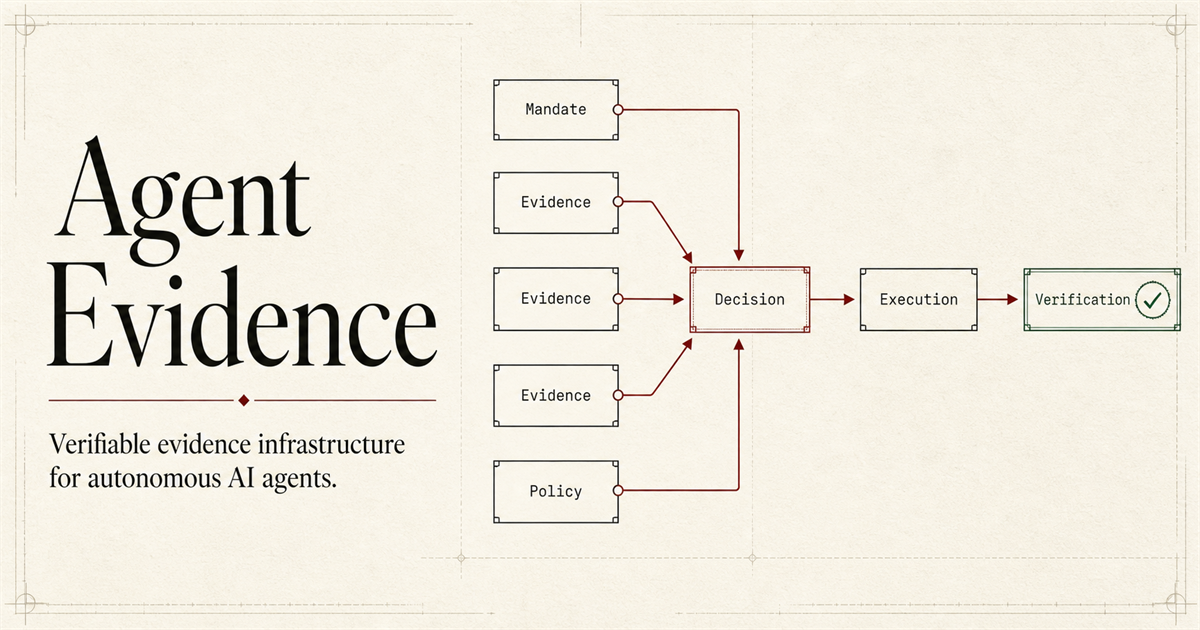
Nidhipati produces evidence rather than moving money. Its signed receipt is meant to show what an agent was authorised to pay, what it paid, what it used and what was refunded. The README states it is not a token, not custody and not a payment rail.
The MCP server offers five read-only tools: verify_receipt, audit_spend, reserve_report, resolve_report and reconcile_books. Inputs are data rather than file paths or network calls. The reserve report computes NAV from issuer numbers with explicit formulas and gives a verdict of backed, underbacked or incomplete, and it refuses to print a ratio when any line has no price. Resolution reports return supported, disputed, single_source or insufficient and never pick a winner. Reconciliation matches invoices to transfers and counts a duplicated transfer once.
A free tier allows 25 calls a day. Beyond it, calls cost $0.02 in USDC on Base via x402, or $19 for 30 days with no daily cap.
Install
Run in a terminal
claude mcp add --transport http nidhipati https://rta.lat/nidhipati/mcpAdd to Settings → Connectors → Add custom connector
https://rta.lat/nidhipati/mcpAdd to ~/.cursor/mcp.json
{
  "mcpServers": {
    "nidhipati": {
      "url": "https://rta.lat/nidhipati/mcp"
    }
  }
}Add to .vscode/mcp.json
{
  "servers": {
    "nidhipati": {
      "type": "http",
      "url": "https://rta.lat/nidhipati/mcp"
    }
  }
}
Add to ~/.codeium/windsurf/mcp_config.json
{
  "mcpServers": {
    "nidhipati": {
      "serverUrl": "https://rta.lat/nidhipati/mcp"
    }
  }
}
Add to Grok Bot desktop app → Connect apps → Add a custom connector
https://rta.lat/nidhipati/mcpEnter a Name (for example "nidhipati — proof of spend for AI agents"), choose Type: Remote HTTPS, paste this as the Server URL and choose Add plugin.
Add to your client's MCP settings (most use this shape)
{
  "mcpServers": {
    "nidhipati": {
      "type": "http",
      "url": "https://rta.lat/nidhipati/mcp"
    }
  }
}
Using several servers? Build one config file with the MCP config generator.
Tools this server provides (5)
Taken from the project documentation; the running server may differ.
- verify_receipt
- Verify a signed spend receipt.
- audit_spend
- Audit agent spending records.
- reserve_report
- Compute a NAV and backing verdict from reserve data.
- resolve_report
- Report on resolution evidence.
- reconcile_books
- Match invoices against transfers.
What it does
- Receipt verification
- Checks a signed proof of what an agent was allowed to pay and did pay.
- Spend audit
- Audits records of agent spending.
- Reserve and NAV report
- Backed, underbacked or incomplete verdicts, refusing ratios on unpriced lines.
- Resolution evidence
- Four verdicts on whether a resolver's sources support its claim.
- Invoice reconciliation
- Shows what is closed, unpaid or paid without an invoice.
- Read-only tools
- No custody, keys or chain reads.
Good for
- Verify a receipt before trusting an agent's payment claim
- Audit what an agent spent last month
- Check a tokenised asset's reserve backing
- Compare resolution sources for a disputed market
- Reconcile invoices against transfers
Pricing
Freemium, from $19 a month
25 free calls/day; $0.02 per call; $19 per 30 days
Prices change. Check rta.lat before you buy.
nidhipati — proof of spend for AI agents FAQ
What does it cost?
25 calls a day are free; after that $0.02 per call in USDC on Base, or $19 for 30 days.
Do I need an account?
The pricing page says no account or API key for pay-per-call; you ask, sign and retry.
Does it hold funds?
No. The README says it is not custody and not a payment rail.
How do I run it locally?
Run the stdio module or the Docker image ghcr.io/mrpkk/nidhipati.
Is nidhipati — proof of spend for AI agents free?
nidhipati — proof of spend for AI agents has a free plan, with paid plans for more usage or features. Paid plans start at $19 a month.
How do I add nidhipati — proof of spend for AI agents to Claude Code?
Run this command in your terminal: claude mcp add --transport http nidhipati https://rta.lat/nidhipati/mcp
What are the best alternatives to nidhipati — proof of spend for AI agents?
The closest alternatives to nidhipati — proof of spend for AI agents are OnChainDiligence, Agent Receipt Verify, Screwtape.ai, Inam MCP and OnChainDiligence Payment Evidence.
Where this comes from
- Description: written from the project's README and the project's website.
- Install steps: from the official MCP Registry entry.