lilbee
Local AI search over your files, code and crawled sites, with cited answers and a built
- Pricing
- Open source
- Platforms
- Web, macOS, Windows
- Runs
- Locally
- Version
- 0.6.90-beta.693
- Listing updated
- today
About lilbee
lilbee is an open-source MCP server for files and documents. It runs locally on your machine and is started by your AI client.
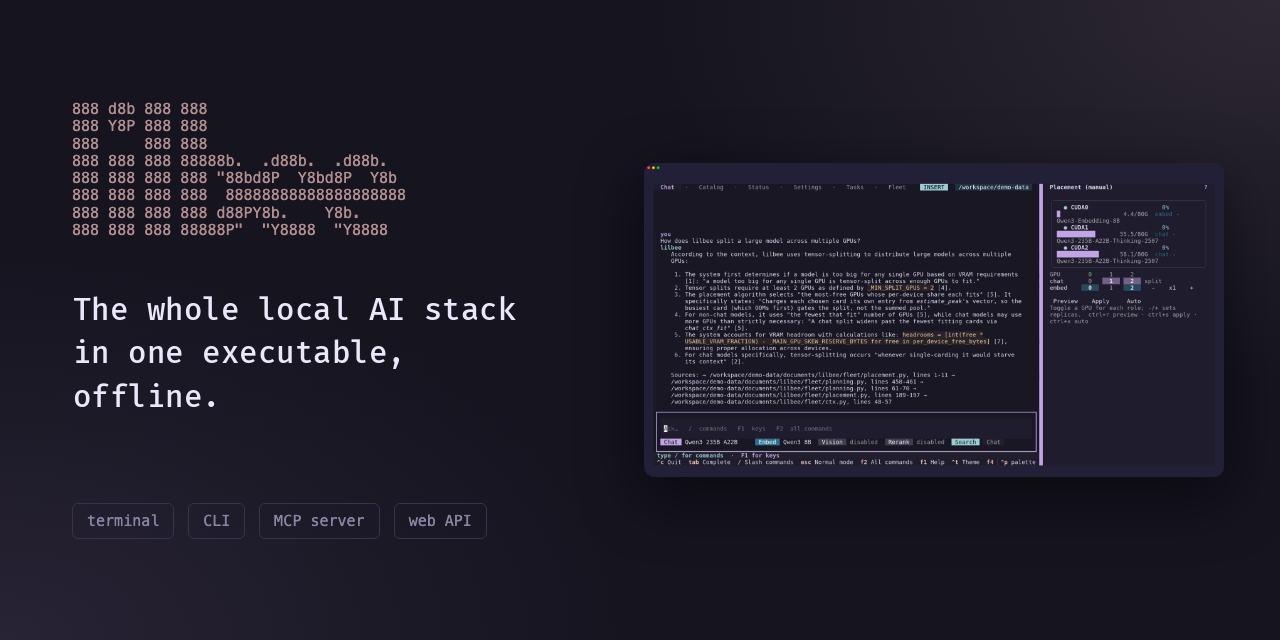
Rather than a model server you wire up yourself, lilbee is a single executable that downloads models from Hugging Face, runs them on local GPUs (Metal, Vulkan, CUDA or ROCm), and places larger models across several cards. Its search indexes folders of PDFs, notes, ebooks, code and scanned images, and every answer links back to the file and line or page it came from.
The README describes a few extras that go beyond plain document chat: a crawler that saves whole docs sites as markdown for offline search, an MCP server that lets coding agents query the library, a launcher that starts opencode, Claude Code, pi or Hermes on local models, and an optional memory feature that is off by default. Existing Ollama and LM Studio installs can be used as backends.
It suits people who want document search and chat on their own hardware without Docker or a separate database, and developers who want their coding agent to answer from a local codebase and docs. The project describes itself as beta, with pre-releases on PyPI and no code signing on macOS arm64 and Windows builds.
Install
Run in a terminal
claude mcp add lilbee -- npx -y lilbeeAdd to claude_desktop_config.json
{
  "mcpServers": {
    "lilbee": {
      "command": "npx",
      "args": [
        "-y",
        "lilbee"
      ]
    }
  }
}Add to ~/.cursor/mcp.json
{
  "mcpServers": {
    "lilbee": {
      "command": "npx",
      "args": [
        "-y",
        "lilbee"
      ]
    }
  }
}Add to .vscode/mcp.json
{
  "servers": {
    "lilbee": {
      "type": "stdio",
      "command": "npx",
      "args": [
        "-y",
        "lilbee"
      ]
    }
  }
}
Add to ~/.codeium/windsurf/mcp_config.json
{
  "mcpServers": {
    "lilbee": {
      "command": "npx",
      "args": [
        "-y",
        "lilbee"
      ]
    }
  }
}
Add to your client's MCP settings (most use this shape)
{
  "mcpServers": {
    "lilbee": {
      "command": "npx",
      "args": [
        "-y",
        "lilbee"
      ]
    }
  }
}
Using several servers? Build one config file with the MCP config generator.
What it does
- Built-in model manager
- Browses Hugging Face, downloads GGUF models, assigns them roles and runs them on the local GPU.
- Cited answers
- Responses name the source file and line or PDF page, which can be clicked to open the source.
- Multi-GPU placement
- Splits a large chat model across several cards and copies the embedder to each one.
- Website crawler
- Fetches pages, including recursive crawls, into markdown in the library for offline search.
- MCP server for agents
- Exposes search over the Model Context Protocol so MCP-aware coding agents can cite your files.
- Code-aware chunking
- Splits code by function and class using tree-sitter rather than fixed line ranges.
Good for
- Search a folder of manuals, PDFs or research papers and get answers with page citations
- Give a coding agent a local reference of project code, dependencies and API docs
- Keep an offline copy of a documentation site or wiki that is searchable without internet
- Run a local chat model on an existing GPU without setting up Docker or a model server
- Index scanned documents through OCR or a local vision model for search
Pricing
Open source
Free and MIT-licensed; optional cloud models require your own API key.
Prices change. Check lilbee.sh before you buy.
lilbee FAQ
Does my data leave my machine?
The README says files, the index and questions stay local, and a cloud model is used only when one is selected.
Which platforms are supported?
Prebuilt bundles exist for macOS, Windows and Linux, with Metal, Vulkan, CUDA and ROCm variants, plus npm, PyPI and Docker options.
Is lilbee open source?
The repository is published under the MIT licence.
Is lilbee free?
Yes. lilbee is open source, so you can use and self-host it for free.
How do I add lilbee to Claude Code?
Run this command in your terminal: claude mcp add lilbee -- npx -y lilbee
What are the best alternatives to lilbee?
The closest alternatives to lilbee are SSRS2, ASTra, CARTESIAN ECU, Invoices and SigPen.
Where this comes from
- Description: written from the project's README, the project's website and its MCP Registry entry.
- Install steps: from the official MCP Registry entry.
Alternatives to lilbee

SSRS2
MCP serverCheck, edit and preview RDLC reports, and turn Markdown into Word, PowerPoint or PDF
- 6 tools
- Remote
- Free trial
- 1 GitHub star
- Files and documents

ASTra
MCP serverLet agents read, edit, validate and undo Word .docx files with exact operations
Runs locally- 5 tools
- Freemium
- Files and documents
CARTESIAN ECU
MCP serverCheck and repair ECU and TCU flash-file checksums from Claude (Ultimate plan)
- 5 tools
- Remote
- Paid
- Files and documents
Invoices
MCP serverMCP server that reads supplier invoices and returns data plus DATEV, CSV or Excel files
- 4 tools
- Remote
- Paid
- Files and documents

SigPen
MCP serverMCP server that drafts e-signature documents while you approve every send
- 13 tools
- Remote
- Freemium
- Files and documents

ConvertAudioToText
MCP serverTranscribe audio and video links from Claude or ChatGPT and read the results
Not checked yet- 5 tools
- Remote
- Freemium
- Design and media