KopiTehnik Converter
Photo converter and print-sheet layout for Windows, drivable by AI agents
- Pricing
- Open source
- Platforms
- Windows, CLI
- Runs
- Locally
- Version
- 3.5.2
- Listing updated
- 3 days ago
About KopiTehnik Converter
KopiTehnik Converter is an open-source MCP server for files and documents. It runs locally on your machine and is started by your AI client.
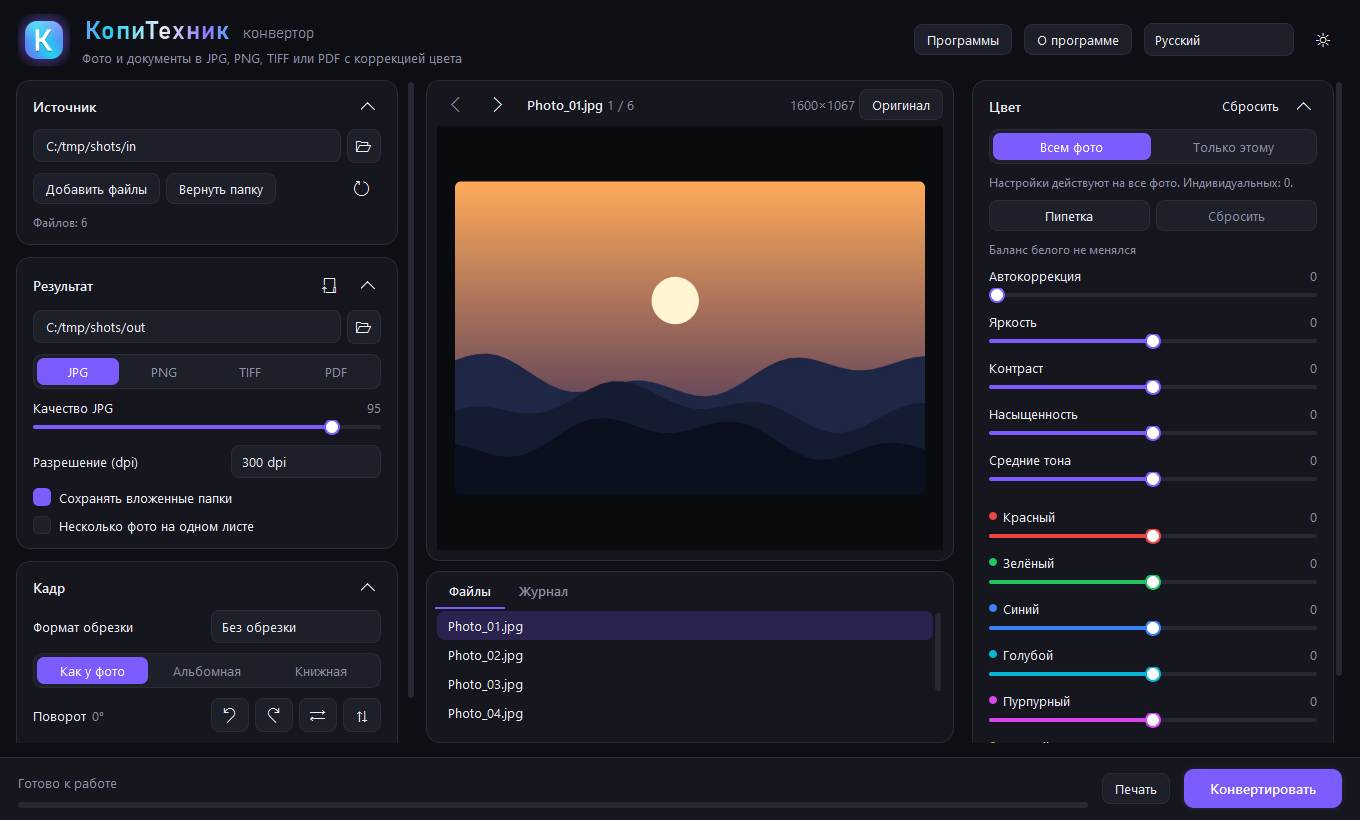
KopiTehnik Converter targets photo labs and print shops, where a customer arrives with a flash drive full of phone HEIC files, PSD, scans, Word and PDF. It normalises the lot in one pass over a folder: converting to JPG, PNG, TIFF or PDF, correcting colour, and laying photos out on sheets with cut marks and captions.
Input covers JPG, PNG, WebP, BMP, GIF, TIFF, HEIC, PSD, PDF, SVG, HTML, XLSX and ZIP archives, with Office formats handled through Microsoft Office or LibreOffice. Colour tools include auto-correction, a white-balance picker and per-channel sliders, and an embedded ICC profile is honoured and converted to sRGB. Ready sheet layouts include 10x15 and 9x12 on A4, several ID-photo sizes and a contact sheet, and printing offers preview, paper size and fit options.
The built-in PDF editor can recognise scans locally in Russian and English with bundled OCR, turn lines into editable blocks, flag doubtful requisites such as tax numbers and mismatched amounts, and export to Word or Excel. The MCP server lets agents such as Claude or Cursor run the same workflow through tools. The software is free for Windows and licensed AGPL-3.0.
Install
Run in a terminal
claude mcp add kopitehnik-converter -- uvx kopitehnik-converter-mcpAdd to claude_desktop_config.json
{
  "mcpServers": {
    "kopitehnik-converter": {
      "command": "uvx",
      "args": [
        "kopitehnik-converter-mcp"
      ]
    }
  }
}Add to ~/.cursor/mcp.json
{
  "mcpServers": {
    "kopitehnik-converter": {
      "command": "uvx",
      "args": [
        "kopitehnik-converter-mcp"
      ]
    }
  }
}Add to .vscode/mcp.json
{
  "servers": {
    "kopitehnik-converter": {
      "type": "stdio",
      "command": "uvx",
      "args": [
        "kopitehnik-converter-mcp"
      ]
    }
  }
}
Add to ~/.codeium/windsurf/mcp_config.json
{
  "mcpServers": {
    "kopitehnik-converter": {
      "command": "uvx",
      "args": [
        "kopitehnik-converter-mcp"
      ]
    }
  }
}
Add to your client's MCP settings (most use this shape)
{
  "mcpServers": {
    "kopitehnik-converter": {
      "command": "uvx",
      "args": [
        "kopitehnik-converter-mcp"
      ]
    }
  }
}
Configuration
KOPITEHNIK_CONVERTER_EXEOptional full path to Converter.exe if KopiTehnik Converter is installed in a non-standard folder.
Tools this server provides (3)
Taken from the project documentation; the running server may differ.
- print_files
- Prints files, with options such as colour or gray output.
- pdf_find_text
- Searches text, including text written by pdf_edit.
- pdf_edit
- Edits PDF text.
What it does
- Batch photo conversion
- Converts photos and documents to JPG, PNG, TIFF or PDF across a whole folder.
- Print sheet layouts
- Builds 10x15, ID-photo and contact sheets with cut marks, margins and captions.
- ICC colour handling
- Honours embedded ICC profiles, converts to sRGB and offers manual colour correction.
- Scan recognition
- Recognises scans offline in Russian and English and turns lines into editable PDF blocks.
- Requisites check
- Highlights doubtful tax numbers, bank details, dates and mixed-alphabet text.
- Crop and tilt
- Mouse-drawn crop frames with fixed formats and tilt of up to 45 degrees.
- Agent control
- Exposes the workflow as MCP tools for Claude, Cursor and similar clients.
Good for
- Prepare a customer's mixed flash-drive files for printing
- Lay out 10x15 or ID-photo sheets with cut marks
- Convert HEIC and PSD photos to JPG or PDF in bulk
- Turn a scanned document into an editable PDF, Word or Excel file
- Let an AI agent run a photo-lab print workflow
Pricing
Open source
Free Windows software, AGPL-3.0
Prices change. Check ildargiv.github.io before you buy.
KopiTehnik Converter FAQ
Which operating system does it need?
Windows. The registry entry points to a Converter.exe, and an environment variable sets its path if installed in a non-standard folder.
Does scan recognition use the cloud?
No. The README says lines are recognised locally with bundled RapidOCR and PaddleOCR models, with no internet needed.
Which languages does OCR cover?
Russian and English.
What is the licence?
AGPL-3.0, and the software is described as free.
Can I print from it?
Yes. It has a print preview, printer and paper selection, copies, page range, and colour or black-and-white output.
Is KopiTehnik Converter free?
Yes. KopiTehnik Converter is open source, so you can use and self-host it for free.
How do I add KopiTehnik Converter to Claude Code?
Run this command in your terminal: claude mcp add kopitehnik-converter -- uvx kopitehnik-converter-mcp
What are the best alternatives to KopiTehnik Converter?
The closest alternatives to KopiTehnik Converter are HyperFrames by HeyGen, ffmpeg-skill, ASTra, AvatarSay — Fictional Character & Talking Video MCP and ChartAnt.
Alternatives to KopiTehnik Converter

HyperFrames by HeyGen
MCP serverHosted MCP connector for creating and rendering videos from HTML through AI chat
- Remote
- Freemium
- 85.3K GitHub stars
- Design and media

ffmpeg-skill
MCP serverLocal FFmpeg video and audio editing tools for coding agents over MCP
Runs locally- Open source
- 6.9K GitHub stars
- Design and media

ASTra
MCP serverLet agents read, edit, validate and undo Word .docx files with exact operations
Runs locally- 5 tools
- Freemium
- Files and documents

Generate fictional character portraits and lip-synced talking videos from text over MCP
- 10 tools
- Remote
- Freemium
- Design and media

ChartAnt
MCP serverRemote MCP server returning charts, maps and dashboards as hosted PNG links
- 51 tools
- Remote
- Freemium
- Design and media

VfxSmith
MCP serverSearch, generate, refine and export pixel art game effects from Claude Code or Codex
Not checked yet- Remote
- Freemium
- Design and media