Job-application tracker
Keep a job-application spreadsheet in Excel, CSV or Google Sheets updated by Claude
- Pricing
- Open source
- Platforms
- CLI, macOS, Windows
- Runs
- Locally
- Version
- 0.8.6
- Listing updated
- 3 days ago
About Job-application tracker
Job-application tracker is an open-source MCP server for files and documents. It runs locally on your machine and is started by your AI client.
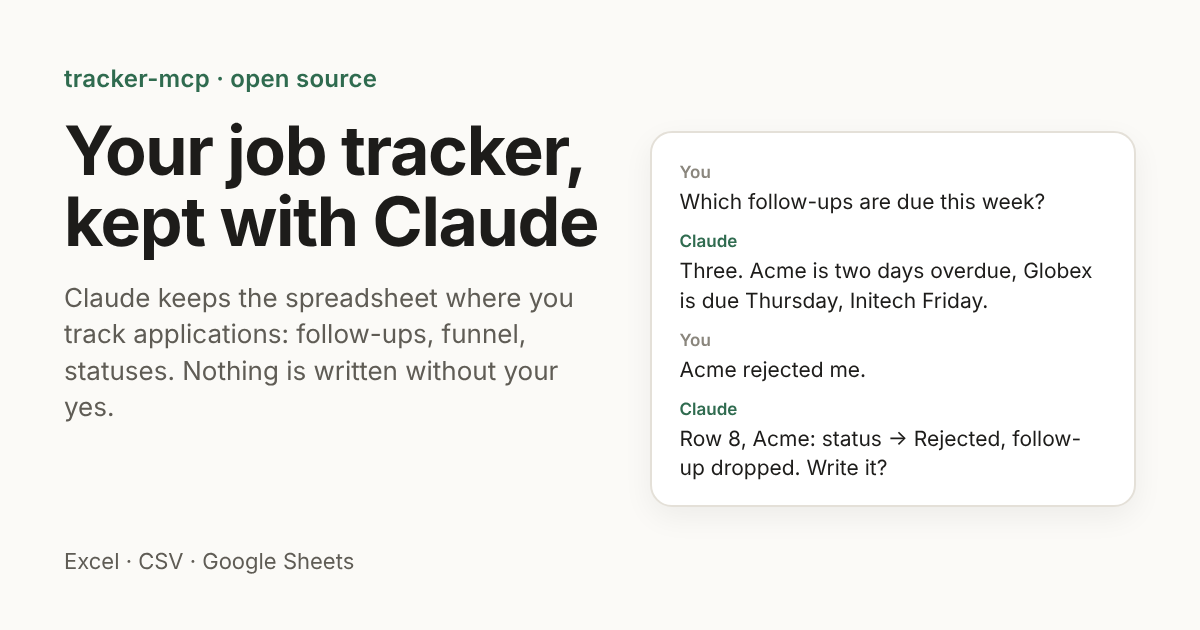
tracker-mcp works on the spreadsheet you already use to track applications and reads your own headers and dropdowns instead of imposing a template. English and Russian headers are understood, and on first start it writes a small config file next to the tracker without touching the tracker itself.
It answers from the sheet, applies follow-up rules such as 10 days after applying and then every 14 with weekends moved to Monday, and finds applications that have gone silent. A funnel view goes from submitted to replied, screening, interview and offer, split by channel, source or month.
Nothing is written without a yes: you see the exact cells first, a backup is taken, and an audit log and undo are kept. Excel and CSV files stay on your computer. For Google Sheets, sign-in requests only the drive.file permission and the developer has no server that receives data. It is free, open source (MIT) and installed with uvx.
Install
Run in a terminal
claude mcp add tracker-mcp --env TRACKER_PATH='<TRACKER_PATH>' -- uvx tracker-mcpAdd to claude_desktop_config.json
{
  "mcpServers": {
    "tracker-mcp": {
      "command": "uvx",
      "args": [
        "tracker-mcp"
      ],
      "env": {
        "TRACKER_PATH": "<TRACKER_PATH>"
      }
    }
  }
}
Add to ~/.cursor/mcp.json
{
  "mcpServers": {
    "tracker-mcp": {
      "command": "uvx",
      "args": [
        "tracker-mcp"
      ],
      "env": {
        "TRACKER_PATH": "<TRACKER_PATH>"
      }
    }
  }
}
Add to .vscode/mcp.json
{
  "servers": {
    "tracker-mcp": {
      "type": "stdio",
      "command": "uvx",
      "args": [
        "tracker-mcp"
      ],
      "env": {
        "TRACKER_PATH": "<TRACKER_PATH>"
      }
    }
  }
}
Add to ~/.codeium/windsurf/mcp_config.json
{
  "mcpServers": {
    "tracker-mcp": {
      "command": "uvx",
      "args": [
        "tracker-mcp"
      ],
      "env": {
        "TRACKER_PATH": "<TRACKER_PATH>"
      }
    }
  }
}
Add to your client's MCP settings (most use this shape)
{
  "mcpServers": {
    "tracker-mcp": {
      "command": "uvx",
      "args": [
        "tracker-mcp"
      ],
      "env": {
        "TRACKER_PATH": "<TRACKER_PATH>"
      }
    }
  }
}
Configuration
TRACKER_PATHYour tracker: an .xlsx or .csv file, or a Google Sheets URLRequiredTRACKER_CONFIGIts config, if not <tracker>.tracker-mcp.toml next to it (written on first start)TRACKER_BACKUP_DIRWhere backups and the audit log go (default: backups-tracker-mcp next to the tracker)TRACKER_READ_ONLY1 to refuse every write (previews only), for a server only scheduled runs useTRACKER_DIALOG_ONLY1 to accept a write only through the client's own confirmation dialog, never a preview tokenGOOGLE_APPLICATION_CREDENTIALSGoogle Sheets only: a service account key, instead of `tracker-mcp auth google`
What it does
- Follow-up rules
- Reminds you what is due on a schedule you set.
- Silent applications
- Finds applications with no reply and closes the rows you pick.
- Funnel view
- Submitted to offer, by channel, source or month.
- Confirmed writes
- Shows the exact cells before changing them.
- Backups and undo
- A backup, audit log and undo for every change.
- Your own layout
- Reads your headers and status dropdowns.
Good for
- Ask which follow-ups are due this week
- Log a rejection by chat
- Find out which channel brings the most replies
- Close everything unanswered after 45 days
Pricing
Open source
Free and MIT licensed
Prices change. Check butyavk.github.io before you buy.
Job-application tracker FAQ
Which trackers work?
An Excel .xlsx file, a CSV file or a Google Sheet.
Does it send my data anywhere?
The site says there is no tracker-mcp server and the developer never receives your data.
Does it edit without asking?
No. Every change is shown first and needs your confirmation.
What do I need installed?
uv, which also fetches Python.
Is Job-application tracker free?
Yes. Job-application tracker is open source, so you can use and self-host it for free.
How do I add Job-application tracker to Claude Code?
Run this command in your terminal: claude mcp add tracker-mcp --env TRACKER_PATH='<TRACKER_PATH>' -- uvx tracker-mcp
What are the best alternatives to Job-application tracker?
The closest alternatives to Job-application tracker are Ha MCP, Concord MCP, Reactive Resume, note1 and ASTra.
Alternatives to Job-application tracker

Ha MCP
MCP serverMCP server for managing and automating Home Assistant from AI assistants
Runs locally- 8 tools
- Open source
- 7.9K GitHub stars
- Productivity

Concord MCP
MCP serverLocal-first MCP server for messaging and shared work-state between coding agents
Runs locally- Freemium
- 1.3K GitHub stars
- Developer tools

Reactive Resume
MCP serverOpen-source resume and cover letter builder with job tracking and an MCP endpoint
- Remote
- Open source
- Hiring and recruiting

note1
MCP serverMCP server giving AI assistants search and summaries across your note1 meetings
- 4 tools
- Remote
- Free trial
- 1 GitHub star
- Productivity

ASTra
MCP serverLet agents read, edit, validate and undo Word .docx files with exact operations
Runs locally- 5 tools
- Freemium
- Files and documents

HeyRole
MCP serverSearch remote jobs, read postings and get application links, no account needed
- 3 tools
- Remote
- Free
- Hiring and recruiting