Jev Filter
Filter search results, code and logs into compact evidence packets for agents
- Pricing
- Open source
- Platforms
- CLI, Linux, macOS
- Runs
- Locally
- Version
- 0.4.2
- Listing updated
- 2 days ago
About Jev Filter
Jev Filter is an open-source MCP server for ai models and llm tooling. It runs locally on your machine and is started by your AI client.
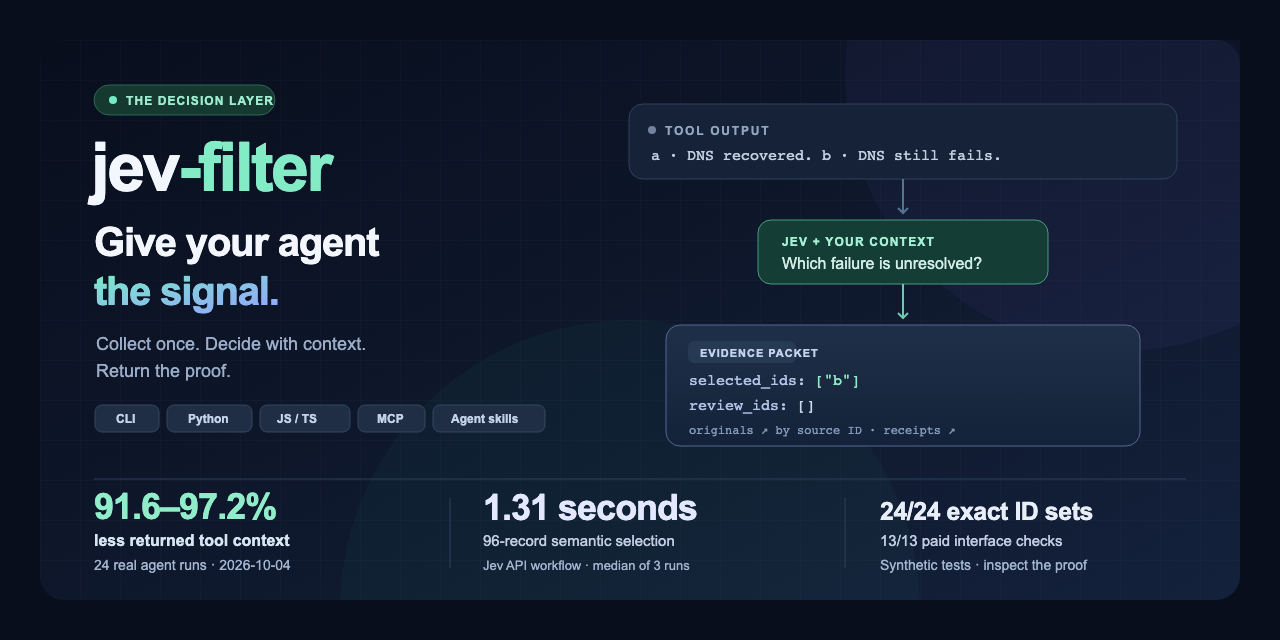
Jev Filter sits between a program's data collection and the main agent. A program gathers search results, code symbols or log events, Jev judges each record against your task, and the agent receives only the selected items, unresolved IDs and review cases. Originals stay recoverable by source ID.
The project publishes a paid test from 2026-10-04 on synthetic inputs: 24 real agent runs showed 91.6 to 97.2 percent less returned tool context, and the filtered agent completed 12 of 12 runs against 11 of 12 with raw context. The authors also report that most measured cells were slower, by 0.1 to 18.4 percent, and say small samples guarantee neither speed nor savings.
It runs through an npm package (@apixly/jev-filter) with a CLI, Python and JavaScript/TypeScript interfaces, and a read-only MCP server. Node.js 22 or later is needed on macOS or Linux, and inference needs a TypeSafe Jev API key whose calls are billable. The project is MIT licensed and maintained by Apixly.
Install
Run in a terminal
claude mcp add jev-filter --env TYPESAFE_API_KEY='<TYPESAFE_API_KEY>' -- npx -y @apixly/jev-filterAdd to claude_desktop_config.json
{
  "mcpServers": {
    "jev-filter": {
      "command": "npx",
      "args": [
        "-y",
        "@apixly/jev-filter"
      ],
      "env": {
        "TYPESAFE_API_KEY": "<TYPESAFE_API_KEY>"
      }
    }
  }
}
Add to ~/.cursor/mcp.json
{
  "mcpServers": {
    "jev-filter": {
      "command": "npx",
      "args": [
        "-y",
        "@apixly/jev-filter"
      ],
      "env": {
        "TYPESAFE_API_KEY": "<TYPESAFE_API_KEY>"
      }
    }
  }
}
Add to .vscode/mcp.json
{
  "servers": {
    "jev-filter": {
      "type": "stdio",
      "command": "npx",
      "args": [
        "-y",
        "@apixly/jev-filter"
      ],
      "env": {
        "TYPESAFE_API_KEY": "<TYPESAFE_API_KEY>"
      }
    }
  }
}
Add to ~/.codeium/windsurf/mcp_config.json
{
  "mcpServers": {
    "jev-filter": {
      "command": "npx",
      "args": [
        "-y",
        "@apixly/jev-filter"
      ],
      "env": {
        "TYPESAFE_API_KEY": "<TYPESAFE_API_KEY>"
      }
    }
  }
}
Add to your client's MCP settings (most use this shape)
{
  "mcpServers": {
    "jev-filter": {
      "command": "npx",
      "args": [
        "-y",
        "@apixly/jev-filter"
      ],
      "env": {
        "TYPESAFE_API_KEY": "<TYPESAFE_API_KEY>"
      }
    }
  }
}
Configuration
TYPESAFE_API_KEYYour TypeSafe Jev API key. Inference calls are billable; do not publish the key.Required
What it does
- Typed evidence packets
- Returns selected IDs, review IDs and a completeness flag instead of raw output.
- Recoverable originals
- Every retained record can be fetched back by source ID.
- Code and log triage
- Judge code symbols by behaviour and separate current failures from recovered log events.
- Automatic batching
- Batches repeated judgements, with at most 30 concurrent requests and no inference-result cache.
- Several interfaces
- CLI, Python, JavaScript/TypeScript and a read-only MCP server.
- Published benchmarks
- Method, per-run data and trade-offs are documented.
Good for
- Cut noisy search results before they enter an agent's context
- Find which code implements a described behaviour
- Pick the current unresolved failure out of correlated logs
- Screen RAG passages against explicit evidence criteria
Pricing
Open source
MIT licensed; inference through the TypeSafe Jev API is billable and needs a key.
Prices change. Check apixly-ai.github.io before you buy.
Jev Filter FAQ
What do I need to run it?
Node.js 22 or later on macOS or Linux, the npm package, and a TypeSafe Jev API key for inference.
Is it free?
The code is MIT licensed, but the README says inference calls are billable.
Does it make agents faster?
Not reliably. The docs say five of six measured cells were slower, and context reduction is the strongest result.
Does it work on Windows?
Use WSL or install Python natively, according to the README.
Is Jev Filter free?
Yes. Jev Filter is open source, so you can use and self-host it for free.
How do I add Jev Filter to Claude Code?
Run this command in your terminal: claude mcp add jev-filter --env TYPESAFE_API_KEY='<TYPESAFE_API_KEY>' -- npx -y @apixly/jev-filter
What are the best alternatives to Jev Filter?
The closest alternatives to Jev Filter are REA, Codebase Memory, GitHub, Serena MCP: the IDE for your agent and XERJ.
Alternatives to Jev Filter

REA
MCP serverCLI and MCP server that lets coding agents reverse engineer apps and binaries
Runs locally- Open source
- 464K GitHub stars
- Developer tools

Codebase Memory
MCP serverLocal MCP server that builds a code knowledge graph for AI coding agents
Runs locally- Open source
- 48.7K GitHub stars
- Knowledge and memory

GitHub
MCP serverOfficial MCP server connecting AI assistants to GitHub repos, issues and workflows
Not checked yet- Remote
- Open source
- 34.5K GitHub stars
- Developer tools

Serena MCP: the IDE for your agent
MCP serverMCP toolkit giving coding agents symbol-level code retrieval and editing
Runs locally- Open source
- 31.5K GitHub stars
- Developer tools

XERJ
MCP serverLocal search engine for AI agents with cited answers over your code and docs
Runs locally- Open source
- 19.2K GitHub stars
- Knowledge and memory

Ouroboros
MCP serverSpec-first layer that pins requirements and verifies results of AI coding agent work
Runs locally- Open source
- 6.4K GitHub stars
- Developer tools