diagonaldiagrams
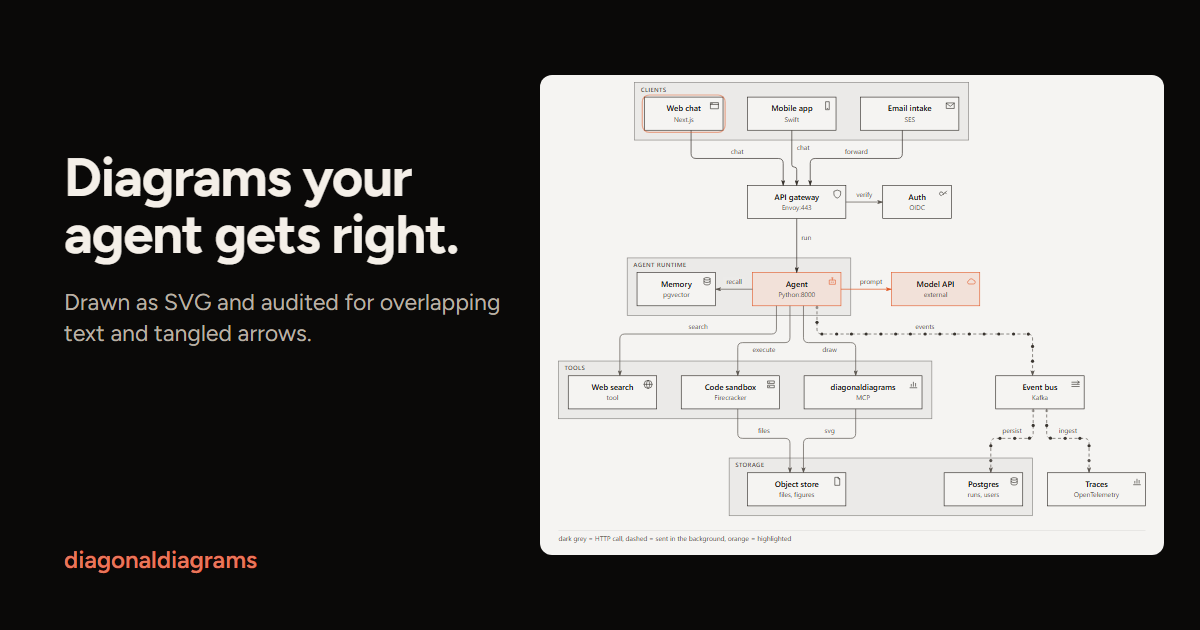
Agents draw Mermaid, JSON or CSV as SVG and get an audit for overlaps before showing it
- Pricing
- Open source
- Platforms
- CLI
- Runs
- Locally
- Version
- 0.9.1
- Listing updated
- 2 days ago
About diagonaldiagrams
diagonaldiagrams is an open-source MCP server for design and media. It runs locally on your machine and is started by your AI client.
The key idea is that an agent should read one line of JSON rather than a screenshot. After laying out and saving an SVG, the tool checks for text on top of text, arrows through boxes and words that spill out of their shapes, and reports either all clear or each problem with a suggested fix. It is a Python library and command line as well as an MCP server, and needs Python 3.11 or newer.
Input can be Mermaid flowcharts, sequence diagrams and ER diagrams, JSON specs for flow, architecture, sequence and schema figures, an isometric layer stack, and CSV for bar, line and scatter charts. A geo command places points on a built-in coastline, and a generic chart command covers about 60 more types. Extras include a fit option for READMEs, multi-view stories that can be filmed as a GIF with ffmpeg, JSON-patch edits, and export to PNG, PDF, draw.io or Excalidraw.
The project publishes its own benchmark against Mermaid CLI and Pele dated 19 October 2026, and its README cautions that the token comparison rests on two runs. It runs through uvx or a Claude Desktop .mcpb bundle.
Install
Run in a terminal
claude mcp add diagonaldiagrams -- uvx diagonaldiagramsAdd to claude_desktop_config.json
{
  "mcpServers": {
    "diagonaldiagrams": {
      "command": "uvx",
      "args": [
        "diagonaldiagrams"
      ]
    }
  }
}Add to ~/.cursor/mcp.json
{
  "mcpServers": {
    "diagonaldiagrams": {
      "command": "uvx",
      "args": [
        "diagonaldiagrams"
      ]
    }
  }
}Add to .vscode/mcp.json
{
  "servers": {
    "diagonaldiagrams": {
      "type": "stdio",
      "command": "uvx",
      "args": [
        "diagonaldiagrams"
      ]
    }
  }
}
Add to ~/.codeium/windsurf/mcp_config.json
{
  "mcpServers": {
    "diagonaldiagrams": {
      "command": "uvx",
      "args": [
        "diagonaldiagrams"
      ]
    }
  }
}
Add to your client's MCP settings (most use this shape)
{
  "mcpServers": {
    "diagonaldiagrams": {
      "command": "uvx",
      "args": [
        "diagonaldiagrams"
      ]
    }
  }
}
What it does
- Audited SVG output
- Checks overlapping text, arrows through boxes and text that does not fit.
- One-line JSON verdict
- Reports ok or the errors with a fix, so no screenshots are needed.
- Mermaid and JSON input
- Flowcharts, sequence and ER diagrams plus JSON specs and CSV charts.
- Many chart types
- Bar, line, scatter, geo, isometric stacks and about 60 more.
- Export formats
- PNG, PDF, draw.io and Excalidraw files.
- Spec editing
- apply edits a figure spec using a JSON patch.
Good for
- Draw an architecture diagram from a text description
- Turn CSV data into a chart for a README
- Produce a sequence diagram without screenshot checking
- Export a diagram to Excalidraw or draw.io
- Film a multi-view figure as a GIF
Pricing
Open source
Free, open source
Prices change. Check lucas19919.github.io before you buy.
diagonaldiagrams FAQ
What does it need?
Python 3.11 or newer; MCP use also needs uv.
How do I add it to an MCP client?
Use command uvx with args diagonaldiagrams and mcp.
What does the check catch?
Text over text, arrows through boxes and words that do not fit their shape.
How does it compare to Mermaid CLI?
On its own 2026-10-19 benchmark a 20-step flowchart took 152 ms against 2,340 ms for Mermaid CLI.
Where do I install it from?
pip install diagonaldiagrams, a Claude Code plugin, or a .mcpb file for Claude Desktop.
Is diagonaldiagrams free?
Yes. diagonaldiagrams is open source, so you can use and self-host it for free.
How do I add diagonaldiagrams to Claude Code?
Run this command in your terminal: claude mcp add diagonaldiagrams -- uvx diagonaldiagrams
What are the best alternatives to diagonaldiagrams?
The closest alternatives to diagonaldiagrams are REA, HyperFrames by HeyGen, Codebase Memory, GitHub and Serena MCP: the IDE for your agent.
Alternatives to diagonaldiagrams

REA
MCP serverCLI and MCP server that lets coding agents reverse engineer apps and binaries
Runs locally- Open source
- 464K GitHub stars
- Developer tools

HyperFrames by HeyGen
MCP serverHosted MCP connector for creating and rendering videos from HTML through AI chat
- Remote
- Freemium
- 85.3K GitHub stars
- Design and media

Codebase Memory
MCP serverLocal MCP server that builds a code knowledge graph for AI coding agents
Runs locally- Open source
- 48.7K GitHub stars
- Knowledge and memory

GitHub
MCP serverOfficial MCP server connecting AI assistants to GitHub repos, issues and workflows
Not checked yet- Remote
- Open source
- 34.5K GitHub stars
- Developer tools

Serena MCP: the IDE for your agent
MCP serverMCP toolkit giving coding agents symbol-level code retrieval and editing
Runs locally- Open source
- 31.5K GitHub stars
- Developer tools

XERJ
MCP serverLocal search engine for AI agents with cited answers over your code and docs
Runs locally- Open source
- 19.2K GitHub stars
- Knowledge and memory