Plazmapunk
AI music video generator that syncs visuals to a track, for musicians and creators
Plazmapunk is a freemium AI tool for generative video. It is available on Web.
- Pricing
- Freemium
- Platforms
- Web
- Listing updated
Similar tools
About Plazmapunk
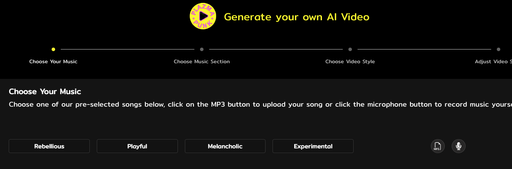
The README-free product site describes a browser app where you upload an MP3 or WAV, or record from a microphone, and the tool builds a video that follows the song's beat, instruments and lyrics. Visual direction comes from preset looks such as 16mm film, anime, cyberpunk, claymation and vaporwave, or from a custom prompt that an enhancer expands into a full scene description.
Two workflows are offered. Quick Video turns one prompt into a complete clip, while the Scene Editor lays out scenes along the song's waveform, lets you reorder them, and can use starting images to keep a story continuous. An AI Director can draft a full set of scene prompts from one idea. Clips are generated with Plazmapunk's own LTX 2.5 model or Google Veo 3.1, and a separate Spotify Canvas mode produces 9:16 loops.
The product is aimed at independent artists and music creators who want music videos or short social clips without editing skills. Output is an MP4 in 16:9, 9:16, 1:1 or 4:3, and the site says generation usually takes two to four minutes.
What it does
- Audio-synced visuals
- Analyzes the track and cuts visuals to its beat, instruments and lyrics.
- Scene-by-scene editing
- Arrange and direct scenes along the song's waveform in a dedicated editor.
- AI Director prompts
- Generates a full set of scene prompts from a single creative idea.
- Preset visual styles
- Choose looks such as 16mm film, anime, cyberpunk, claymation or vaporwave, or describe your own.
- Spotify Canvas loops
- Creates 9:16 looping visuals for Spotify Canvas.
- Multiple aspect ratios
- Exports MP4 in 16:9, 9:16, 1:1 or 4:3 for different social platforms.
Good for
- Making a music video for a single release without hiring a video editor
- Producing vertical clips for TikTok, Reels or YouTube Shorts from a track
- Creating looping Spotify Canvas visuals for a song
- Storyboarding a multi-scene video using starting images and scene order
Pricing
Freemium
Free plan with 200 credits; Punk plan with 4,000 credits per month and paid tiers above it
Prices change. Check plazmapunk.com before you buy.
Plazmapunk FAQ
Is there a free plan?
Yes. The Free plan includes 200 credits to start, custom music upload, 4:3 aspect ratio and one-prompt video without the Scene Editor.
What file types can I upload?
The site says MP3 or WAV files at least 15 seconds long, and you can also record from your microphone or pick a song from a free library.
Which video models does Plazmapunk use?
It uses LTX 2.5, described as Plazmapunk's own model, and Google Veo 3.1 for premium clips.
Are the videos watermarked?
Paid plans remove the watermark and add Full HD upscaling, according to the pricing page.
What are the best alternatives to Plazmapunk?
The closest alternatives to Plazmapunk are Wzrd.ai and Neuralframes.
Where this comes from
- Description: written from the project's website.